Enhanced Research Assistant: AI-Powered Tool for Efficient Research
This blog post explores my 2025Q1 Kaggle Gen AI Intensive Course Capstone project, where I built an AI-powered research assistant to automate web searches, content extraction, summarization, and report generation. The assistant uses Retrieval Augmented Generation, embeddings for semantic search, and document understanding to deliver polished, relevant reports in minutes, tackling information overload for students and professionals. Future enhancements may include source validation and multi-modal support.
Automating Research: Enhanced Research Assistant
In today’s information-rich era, finding and synthesizing knowledge can feel like searching for a needle in a haystack. Whether you’re a student racing to finish a paper, a professional gathering insights for a presentation, or a curious mind exploring a new topic, the process is often slow, tedious, and overwhelming. Researchers, students, and professionals face information overload, spending hours poring over dozens of papers and articles, only to juggle notes and write summaries by hand. The Enhanced Research Assistant project addresses this challenge. It’s an AI-driven pipeline that automates web search, content extraction, summarization, and report writing. By leveraging generative AI, it turns a query into a polished research report in minutes instead of days.
About the Competition
This project was developed as a capstone for Google’s Kaggle GenAI Intensive Course (2025 Q1). The five-day course (March 31 – April 4, 2025) taught fundamentals of generative AI and encouraged participants to apply their skills in a real-world challenge. Hundreds of learners built creative tools to showcase Google’s GenAI APIs and advanced models. The Enhanced Research Assistant was one such capstone entry, demonstrating how RAG (Retrieval-Augmented Generation) and embeddings can tackle information overload in research.
Project Idea
The Enhanced Research Assistant is essentially a virtual research aide. Imagine a super-smart librarian who instantly finds relevant papers, reads the key sections, and writes a concise report on your topic. In practice, the tool takes a user’s topic or question, searches the web (including PDFs), cleans and summarizes the content, picks the most relevant insights via semantic similarity, and finally generates a structured report with an introduction, key findings, and conclusion.
This pipeline-style tool was built in Python, using Google’s generative APIs and open-source libraries. Its purpose is to save time and improve research quality for students, professionals, and curious learners who need quick, fact-based overviews of new domains. In a user scenario, for example, a student pressed for deadline can input their topic and receive a draft literature survey in minutes. A data analyst can use it to summarize recent news articles on a trending technology. Here is the Kaggle notebook for the project to make it easy for others to reuse or extend this functionality.
Use Cases and Importance
The Problem We’re Solving
Research today is bogged down by several challenges:
- Information Overload: With billions of web pages, articles, and documents online, finding relevant sources is like drinking from a firehose.
- Time Constraints: Manually reading and summarizing content can take hours or days—time most of us don’t have.
- Quality Assessment: Not every source is trustworthy, and spotting the good ones requires effort and expertise.
- Synthesis Difficulty: Combining insights from multiple sources into a coherent narrative is a skill that takes practice and patience.
How Generative AI Solves the Problem
The Enhanced Research Assistant leverages a suite of advanced AI techniques to transform chaos into clarity. Here’s the tech powering it:
- Retrieval Augmented Generation (RAG): Combines real-time web searches with AI generation to ground reports in fresh, factual data.
- Embeddings for Semantic Search: Understands the meaning behind words to find sources that truly match your topic, not just keyword hits.
- Document Understanding: Extracts and cleans content from messy web pages and PDFs, making sense of varied formats.
- Structured Output Generation: Organizes insights into professional reports with clear sections like introductions and conclusions.
- Long Context Windows: Handles large amounts of text at once, ensuring summaries and reports stay cohesive and comprehensive.
Together, these capabilities turn a vague query into a detailed, readable report—fast.
Uses
The Enhanced Research Assistant is designed to solve these problems by automating the entire research pipeline, from finding relevant sources to generating polished reports. This AI-powered tool streamlines discovery, saving users hours of tedious work while ensuring high-quality, relevant output.
The Enhanced Research Assistant is beneficial for a wide range of users:
- Students & Academics: Quickly get up to speed on a topic or gather references. Instead of manually opening many tabs, the tool surfaces the most relevant summaries.
- Professionals & Business Users: Produce briefings or reports on industry trends, scientific advances, or market research without reading every source by hand.
- Curious Readers: Explore new interests or hobbies (e.g., “How does CRISPR work?”). The assistant curates and explains information at your level.
These use cases directly address challenges like information overload and tight time constraints. By automating the laborious steps, the assistant helps users focus on analysis and decision-making instead of wading through raw documents.
Step-by-Step Breakdown of the Workflow
The Pipeline
The Enhanced Research Assistant is structured as a modular pipeline, making it easy to understand and extend. Here’s an overview of the workflow, from the user’s query to the final report:
| |
Each module (search, extraction, etc.) is a separate component. The system first runs the search module to fetch URLs, then passes those URLs into the extraction module to get raw text, and so on. This design means you could swap out pieces (for example, use a different search API or summarization model) without rewriting the whole tool.
Let’s break down the pipeline’s structural components step by step:
Web Search (Google CSE API)
We use the Google Custom Search API to find relevant web pages and PDFs for the given topic.
| |
This function sends your query (e.g., “quantum computing cryptography”) to Google, asking for up to five web pages or PDFs. It waits a second between requests to respect rate limits, then returns a list of URLs. If something fails (like a bad API key), it safely returns an empty list.
Tip: Use focused queries. Asking a precise question (e.g., “applications of quantum computing in cryptography”) helps retrieve the most relevant sources before synthesis.
Content Extraction (HTML and PDF)
The assistant fetches each URL and extracts readable text. For HTML pages, we use requests and BeautifulSoup to strip out scripts and boilerplate, keeping paragraphs of text. For PDF links, we use PyPDF2 (or similar) to extract text from each page. For example:
| |
The get_web_text function works for both web pages and PDFs. If the link points to a PDF, it reads text from every page. Otherwise, it loads the HTML page and concatenates all the text from <p> tags (paragraphs). Finally, it trims the text to 8000 characters to fit the AI model. For web pages, this removes noise like scripts and styles, and for PDFs, it extracts text from each page. If the page fails to load, it returns a simple placeholder based on the URL.
Note: This step is about document understanding. We clean out scripts and styling since they are noise. (Some sites may require extra cleaning, and very short pages are skipped.) PDFs can be tricky: complex layouts might yield gaps or errors. In those cases, at least the raw text is captured.
Summarization (Gemini API)
Each piece of extracted text can be very long. We use a generative AI model (Google’s Gemini) to condense it. For each text snippet, we build a prompt and get back a summary. For example:
| |
The prompt instructs the model to focus on key facts and return a concise summary in a few paragraphs. We often cap the input (e.g. first 5000 characters) to fit the model’s context window. If the API call fails, we catch exceptions and skip that source. Telling the model to output structured bullet points or headings can improve readability. Also, adding time.sleep(1) between requests helps avoid throttling.
Embedding and Semantic Search
Now we have a set of summaries (one per source). We want to pick the most relevant ones for the original query. We convert the user query and all summaries into vector embeddings (using a sentence-transformer or Gemini’s embedding model) and compute cosine similarity to the query. Semantic embeddings capture meaning beyond keywords. In practice, this ensures we choose summaries that are on-topic. (For instance, if our topic is about “quantum cryptography”, a page about classical cryptography would rank lower even if it shares words like “encryption”.)
For example:
| |
This code loads a small pre-trained model, encodes the topic and each summary into numerical vectors (embeddings) and measures how similar they are, and then ranks them by similarity. We then pick the top 3 sources. This is classic semantic search or semantic filtering. If embeddings fail (e.g. due to missing API key), we default to the first few summaries.
Synthesis: Report Generation (Gemini API)
Finally, we synthesize the information into a coherent report. We concatenate the top summaries (and their source URLs) as context and prompt Gemini to write the report:
| |
This code combines the top summaries into a context, then asks Gemini to craft a report with specific sections (Introduction, Key Findings, Conclusion) by generating content based on the provided context. If it fails, you get a simple error message. The generative model uses these summaries as evidence to draft a polished report, and if anything goes wrong (e.g. API failure), we catch it and return an error message instead.
Testing
Sample Topic as Input
Now, let’s demonstrate our Enhanced Research Assistant by generating a research report on a sample topic. For this demonstration, we’ll be using our kaggle notebook example, and use placeholders for the API keys (in a real Kaggle notebook, you would add your actual API keys).
Let’s run our research assistant on a sample topic:
| |
Output
| |
Here is the output of the research assistant.
The output of the research assistant for this topic is a well-structured and coherent report that addresses the question of how life began on Earth. The report is divided into sections, including background, key findings, current research, and conclusion. The language is clear and concise, and the report includes relevant citations to support the information presented. This demonstration shows the potential of the Enhanced Research Assistant to generate high-quality reports on a wide range of topics. In the next section, we explore how to evaluate and further test the project.
Evaluation & Further Testing
Automated systems can produce plausible text that sounds right but may miss important structure, lack references, or drift off-topic. A lightweight evaluation helps capture those issues and guides improvements.
To understand how well the Enhanced Research Assistant performs in the wild, we evaluated it across several topics from different domains (machine learning, biology, physics, medicine). The goal of this evaluation was pragmatic: measure structural quality of generated reports and get an automated gauge of topical relevance using the Gemini model itself.
Report Quality Evaluation Framework
We used a compact evaluation function that computes four simple metrics from each generated report:
- Word count — measures report length and (roughly) depth.
- Section count — counts top-level sections (markdown
##) to assess structure. - Reference count — number of entries in the
## References section(if present). - Topic relevance (1–10) — a numeric relevance score returned by a generative model prompt (Gemini). If the automated score cannot be determined, the function falls back to a neutral default (5.0).
Note: Automated relevance scoring using an LLM provides quick signals but is not a replacement for careful human evaluation. Use the LLM-based score for triage and the human review for production-quality validation.
Here’s a cleaned, reusable implementation of the evaluation function:
| |
The evaluate_report function assesses the quality of a generated research report by computing both structural and semantic metrics. It first calculates the total word count, the number of sections based on markdown headers (##), and the number of references listed under a ## References section. To measure topical accuracy, it optionally leverages a Gemini model to score the report’s relevance to the original query on a scale of 1 to 10, defaulting to 5.0 if the model call fails or the response cannot be parsed. The function then returns these results as a dictionary containing word_count, section_count, reference_count, and topic_relevance, providing a concise overview of the report’s structure and focus.
Testing on Multiple Domains
We tested the assistant on four representative topics:
- How does Logistic Regression work for classification? — (Machine Learning)
- CRISPR Gene Editing: Ethical Considerations — (Biology / Ethics)
- Dark Matter Detection Methods — (Physics)
- Machine Learning in Medical Diagnosis — (Medicine / Applied ML)
| |
For each topic we:
- Generated a report with the pipeline (
search→extract→summarize→select→synthesize). - Saved the report to disk.
- Ran
evaluate_report(...)to extract the four metrics above. - Stored the results for visualization and comparison.
Visualizing Results
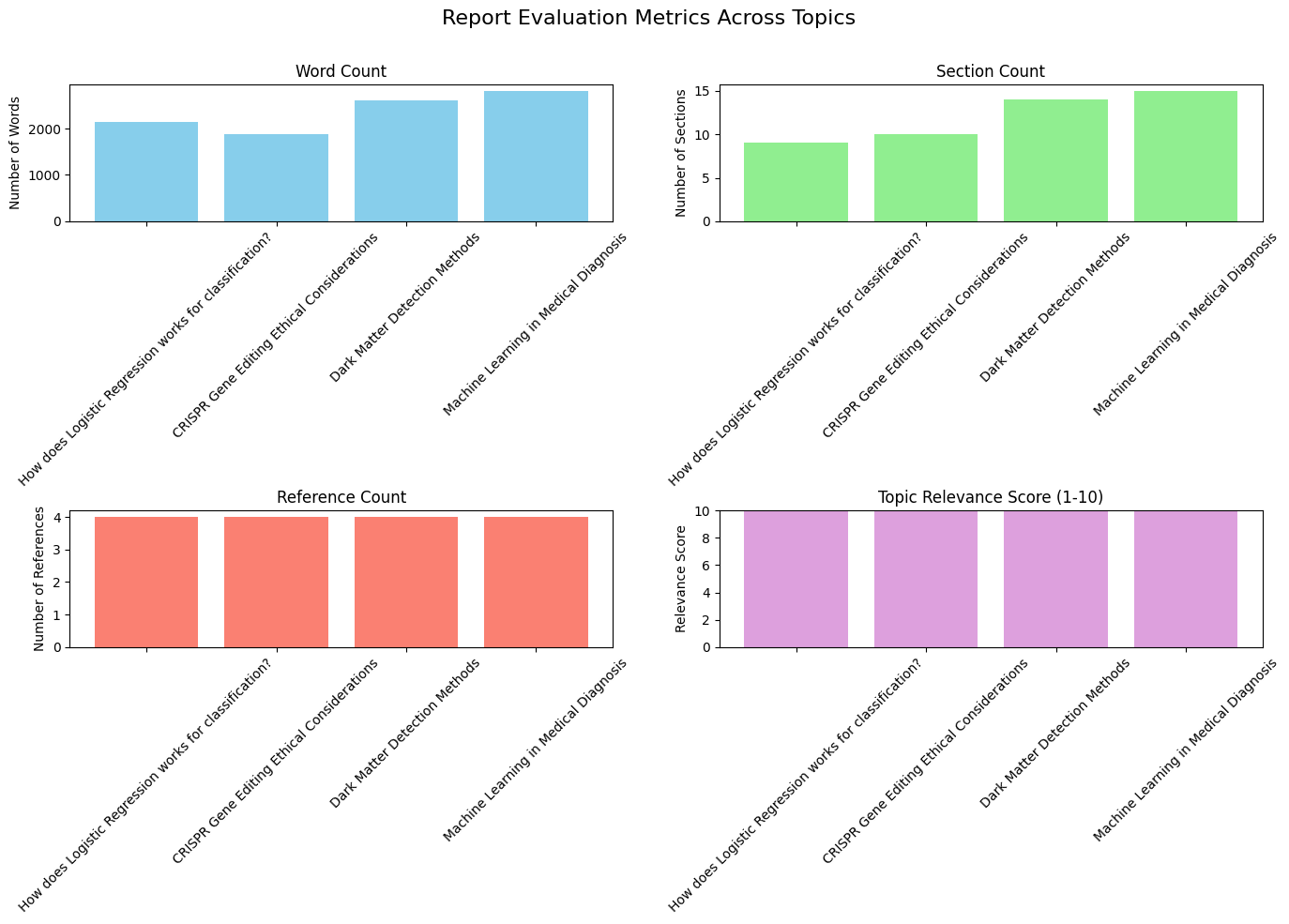
To compare performance across topics we plotted the four evaluation metrics. The dashboard includes:
- Word Count (how long the reports were)
- Section Count (how many ## sections)
- Reference Count (how many references were detected)
- Topic Relevance (1–10 score from Gemini)
| |
Interpreting the Metrics
The visual patterns and raw numbers reveal a few meaningful points:
Word Count: Topic complexity drives length. Technical topics like Machine Learning in Medical Diagnosis and Dark Matter Detection Methods produced longer reports (more depth), while practical/FAQ-style queries can be shorter.
Section Count: A higher section count indicates better structural decomposition (intro, background, methods, results, conclusion). Values above ~10 show the generator produced a detailed, multi-part report.
Reference Count: The pipeline successfully captured and summarized sources; however the counting is simple and conservative (it only counts lines after ## References), so it might undercount in nonstandard formats.
Topic Relevance: In this run, relevance scores were consistently high — demonstrating that the model can stay focused across domains. However, automatic scores can be overly optimistic; human checks are essential for nuance and factuality.
Summary table (example):
| # | Topic | Word Count | Section Count | Reference Count | Topic Relevance |
|---|---|---|---|---|---|
| 0 | How does Logistic Regression works for classification | 2140 | 9 | 4 | 10 |
| 1 | CRISPR Gene Editing Ethical Considerations | 1877 | 10 | 4 | 10 |
| 2 | Dark Matter Detection Methods | 2610 | 14 | 4 | 10 |
| 3 | Machine Learning in Medical Diagnosis | 2812 | 15 | 4 | 10 |
Key takeaway: The assistant produces reasonably long, well-structured and on-topic reports across diverse domains — a promising result for an end-to-end prototype.
Limitations of the Evaluation
Automated metrics are useful, but they have important blind spots:
- Relevance Score Bias: Using an LLM to score its own output risks optimistic bias. The model may rate plausible but factually incorrect text as highly relevant.
- Factuality & Hallucinations: The metrics say nothing about truthfulness. You must add fact-checking or human review for downstream use.
- Citation Quality: Our
reference_countcaptures quantity but not quality—links may be low-authority. - Granularity: Word and section counts are coarse; they don’t capture readability, argument flow, or novelty.
- Domain Expertise: Highly technical domains (e.g., advanced physics) may need domain-specific checks and specialized sources.
Project Limitations
The current prototype is a solid foundation, but it has important limitations and areas for future work:
- Source Reliability: It trusts Google’s search ranking but does not independently verify source credibility. A poor or biased site might sneak in.
- Text-Only: It ignores images, charts, tables, and video content. Rich information (like a research figure or infographic) will be missed.
- One-Shot Output: The tool produces one static report per query. There is no interactive refinement (e.g. asking follow-ups or specifying tone) in this version.
- No Formal Citations: The report text may mention facts but does not generate a bibliography or inline citations. This makes it less suitable for academic publishing where references are required.
- API Dependence: It relies on external APIs (Google Search, Gemini). If keys are invalid or quotas are exceeded, parts of the pipeline will fail or return empty results.
- Cost and Privacy: Using generative AI and APIs can incur costs. Plus, queries and data are sent to those services, which may raise privacy concerns in sensitive contexts.
Future Enhancements
Now that we have seen how the Enhanced Research Assistant works and why it helps, along with its limitations, we can talk about enhancing its capabilities. The Enhanced Research Assistant is a solid prototype, but there are many ways to make it stronger:
- Research-Specific APIs: Integrate academic search APIs (e.g. CrossRef, arXiv, PubMed) to access scholarly papers. This can improve source quality and precision.
- Stronger Models: Experiment with larger or fine-tuned language models (e.g. future versions of Gemini or GPT-5) to improve summaries and coherence.
- Multi-Modal Support: Extend to images or graphs. For instance, extract data from charts or generate illustrative figures for the report. Combining text and visuals can enrich reports.
- Credibility & Fact-Checking: Add filters or LLM-based checks to flag dubious claims. The tool could rate sources on trustworthiness or highlight where evidence is weak.
- Automated Citations: Have the system fetch DOIs or links and append a reference list. An LLM can format citations (APA, MLA, etc.) for the final report.
- Collaborative UI: Build a web interface or Jupyter extension where users can tweak prompts, select sources interactively, or ask for clarifications. Real-time dialogue (like a chatbot) would make the tool more flexible.
Usage Guide
The code for the Enhanced Research Assistant is available in the Kaggle notebook and can be easily run locally. To try it yourself:
Clone the Code: Download the notebook or use the Python script (linked below) .
Install Dependencies: Install the required dependencies using the following command, which includes all necessary libraries for web scraping, AI processing, and report generation:
1!pip install -q -U google-generativeai==0.8.3 requests==2.32.3 beautifulsoup4==4.12.3 pypdf==5.1.0 numpy==1.26.4 sentence-transformers==3.2.1 scikit-learn==1.5.2 scipy==1.13.1 tenacity==9.0.0 kaggle==1.6.17 matplotlib==3.8.0 rich==13.9.2Get API keys: Configure your API credentials by obtaining a Google Custom Search API key, Search Engine ID, and Google Generative AI API key from Google Cloud Platform. Set these as environment variables or pass them directly to the script during execution.
Run the Tool: If using the Python script (given below), you might use a command like:
1python research_assistant.py --topic "machine learning in healthcare"Alternatively, use the Kaggle notebook for step-by-step interactive execution. The notebook environment allows real-time parameter adjustment and provides visibility into intermediate processing results. Enable internet access in your Kaggle settings and execute cells sequentially following the documented workflow. The system automatically performs web searches, extracts relevant content, conducts analysis, and generates comprehensive research reports with proper citations. Output parameters can be adjusted to control report depth, formatting, and source filtering based on specific research requirements. (Parameters may vary depending on how the code is structured.) The script will print or save a generated report.
Conclusion
The Enhanced Research Assistant shows how generative AI can reimagine the research process. By automating search, summarization, and writing, it turns a slow slog into a quick query. Whether you’re exploring a new field, drafting a report, or simply satisfying curiosity, this tool can serve as a powerful first-draft assistant. It’s a showcase of Retrieval-Augmented Generation, semantic search, and AI-driven content creation, integrated into a seamless workflow.
Even in its prototype form, the Enhanced Research Assistant shows promise in making the research process more efficient. Feel free to try it out on a topic of your choice and see how it can help you quickly generate a well-structured report.