The Art and Science of Chroma Keying: Unveiling the Magic Behind Green Screens

In the following article we will see how chroma keying or green screen removal works, and how can we approach the problem.
Unveiling the Magic of Chroma Keying
Introductory Foundation
Chroma keying — often referred to as green screen or blue screen removal — is one of the most enduring techniques in modern visual production. It enables seamless composition of separate images or video streams, making it possible to transport subjects to distant landscapes, futuristic cities, or entirely fictional worlds without ever leaving the studio. Whether in blockbuster films, live television, or online streaming, chroma keying has become a cornerstone of visual storytelling and digital content creation.
A Brief History of Chroma Keying
The concept of compositing — merging two or more image layers into a single coherent frame — dates back to early optical effects in the 1930s and 1940s. Pioneers such as Lawrence Butler (Academy Award, 1940, The Thief of Bagdad) developed manual optical processes that involved photographing actors against a uniform background and then replacing that background during film printing. These early methods were cumbersome and required precise control of lighting and film exposure.
With the rise of color television in the 1970s and later the shift to digital video, chroma keying evolved from a niche special effect into a widely accessible production tool. Advances in computing and real-time graphics in the 1990s and 2000s brought software-based keying systems capable of delivering cleaner, faster results. Today, chroma keying ranges from basic thresholding techniques to sophisticated machine learning–based matte extraction, supporting applications in both live broadcast and high-end post-production.
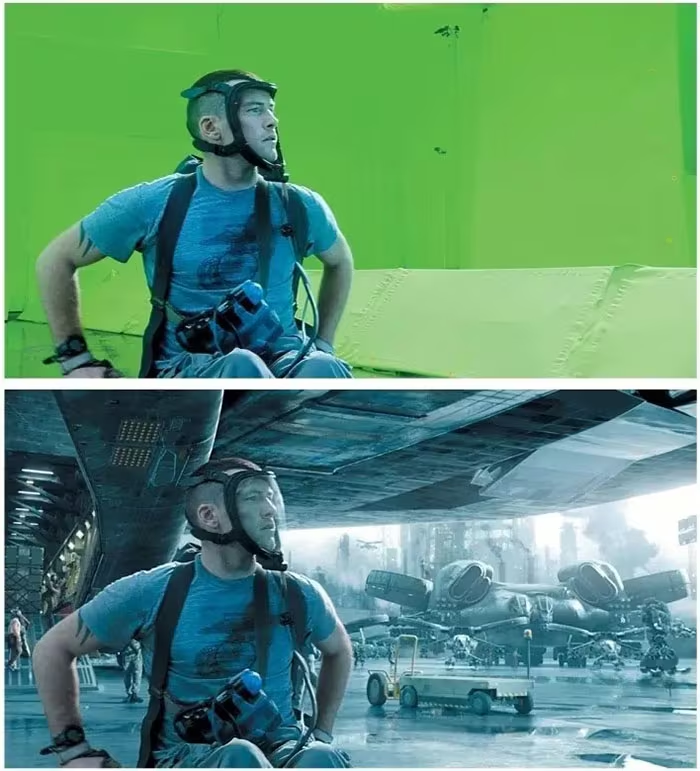
Why Green or Blue?
Chroma keying relies on isolating a specific background color and replacing it with new imagery. In practice, green and blue are used because they are least likely to appear in human skin tones and common clothing. Green screens are especially prevalent in modern digital workflows because:
- Camera sensors are more sensitive to green, providing less noise in the green channel.
- Lower lighting requirements — green screens require less illumination than blue to achieve consistent brightness.
Blue screens, however, remain useful in situations where the foreground contains green elements (e.g., foliage) or when shooting on film stock optimized for blue sensitivity.
Understanding the Color Model Behind Chroma Keying
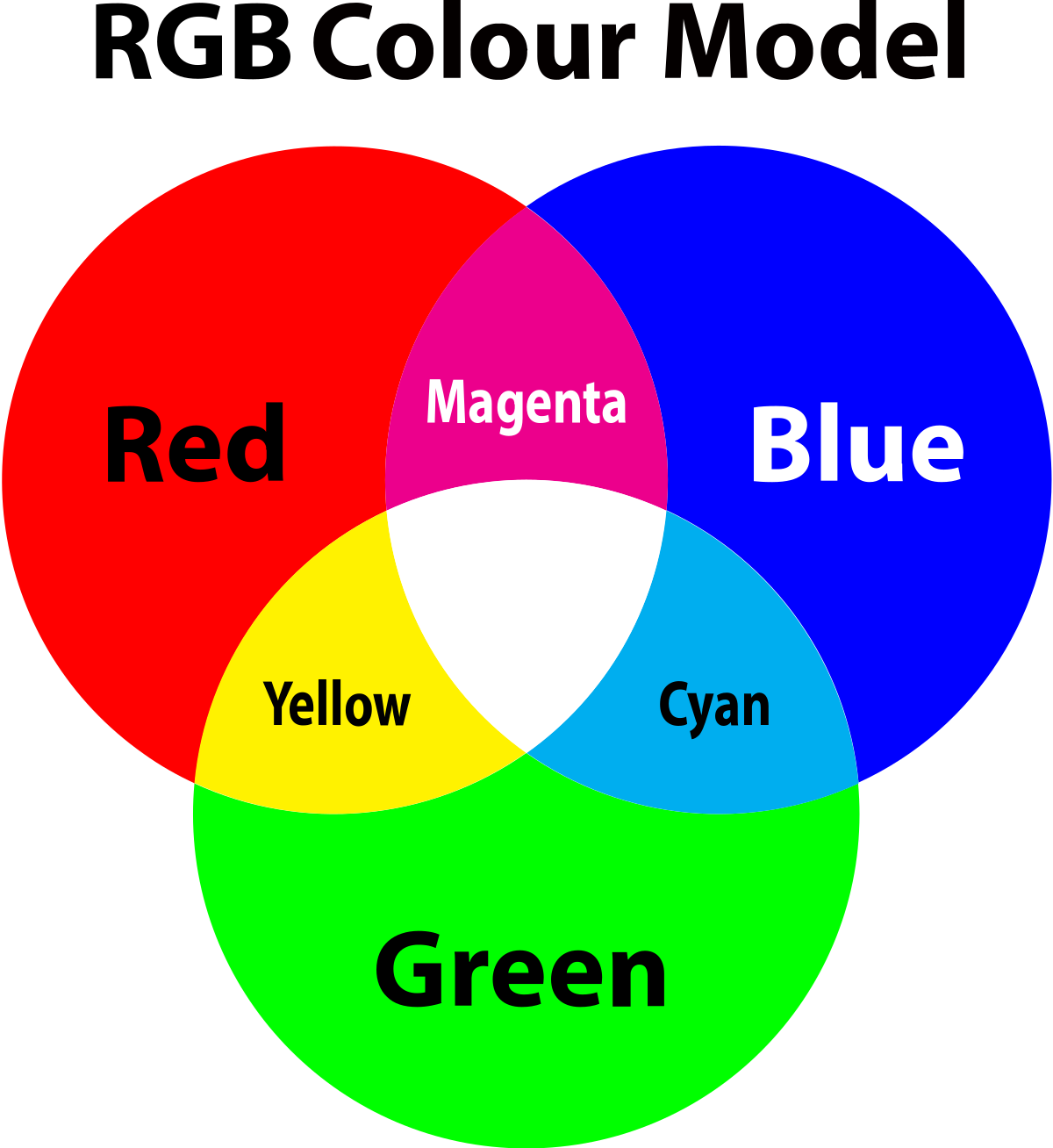
To appreciate how chroma keying works, it is useful to recall the RGB color model used by digital cameras and displays. Every pixel is described by three intensity values: red (R), green (G), and blue (B). A chroma keying algorithm measures how closely each pixel matches the chosen background color.
In its simplest form:
- Pixels whose green (or blue) intensity is dominant are marked as background.
- All other pixels are preserved as foreground.
- Edge regions are smoothed to reduce harsh transitions.
Common Challenges in Chroma Keying
Although the core idea is straightforward, real-world implementation presents several obstacles:
- Uneven Lighting — Wrinkles or shadows on the screen create inconsistent color values, making it difficult to apply a single global threshold.
- Color Spill — Green or blue light reflecting onto the subject creates unwanted tints, particularly on hair or shiny surfaces.
- Fine Details — Semi-transparent regions (hair strands, smoke, glass) require alpha matting rather than a hard cut-out.
- Noise and Compression Artifacts — Digital video compression can introduce blocky edges or color bleeding, degrading key quality.
Addressing these challenges requires both algorithmic refinement (better color separation, edge detection, and spill suppression) and careful capture (controlled lighting, distance between subject and screen, non-reflective materials).
A Comprehensive Exploration and Solution
Our work at ISI Kolkata investigates chroma keying not simply as a classical post-production tool, but as an image-processing problem that demands both mathematical rigor and practical robustness. The goal was to design an algorithm that consistently removes the background from images even under imperfect conditions — such as uneven lighting, shadows, or background colors that are not perfectly uniform.
Defining the Problem
Traditional chroma keying methods rely heavily on fixed color thresholds. For example, a Min–Max Bound method sets explicit upper and lower limits on green-channel intensity, labeling any pixel within that range as background. Similarly, the Pixel Predominantly Green method classifies a pixel as background if its green value dominates over red and blue. These techniques work in controlled studio environments but break down when:
- The lighting is inconsistent, causing parts of the green screen to appear darker or brighter.
- Foreground objects share similar hues with the background, leading to misclassification or “holes” in the subject.
- Color spill or reflections occur, causing green fringes around the edges of the subject.
In short, the problem is not merely detecting a single shade of green; it is robustly separating subject from background in a way that adapts to real-world variability.
To develop a chroma keying system that works outside the ideal conditions of a perfectly lit studio, we experimented with three algorithms. Each step refined our understanding of how to separate background from foreground reliably using color information.
1. Minimum and Maximum Bound Method
The Min–Max Bound method is the most straightforward way to detect a green background. The algorithm defines upper and lower bounds for the Red (R), Green (G), and Blue (B) channels. Any pixel that falls inside these bounds is labeled as background and replaced.
Intuition:
- In a perfect green screen, background pixels have very high green values and moderate to low red and blue values.
- By manually specifying limits like “G must be between 180 and 255 while R and B must be below 100,” the algorithm simply masks out everything in that range.
Simple R snippet:
| |
Limitations:
- Works only if lighting is perfectly uniform.
- Fails when there are shadows (green appears darker than expected).
- Can misclassify foreground objects with similar shades of green.
2. Pixel Predominantly Green Method
The next approach takes a more relative view of color. Instead of fixed thresholds, we classify a pixel as background if its green component is significantly higher than red and blue.
Intuition:
- Compare channels rather than checking absolute intensity.
- If
G > RandG > Bby a certain margin, treat the pixel as green-screen.
Simple R snippet:
| |
Advantages:
- Adapts better to different lighting because it’s based on relative color strength.
- Less sensitive to overall brightness changes.
Limitations:
- Still vulnerable when the subject has greenish clothing or reflections.
- Can produce “holes” inside objects where green tints appear unintentionally.
- Edge artifacts occur when color transitions are soft rather than sharp.
3. Grey Bound — A Robust Hybrid Solution
To overcome these shortcomings, we designed the Grey Bound approach, which combines the clarity of thresholding with the flexibility of relative comparisons.
Key ideas:
- Define thresholds that adapt dynamically to image conditions.
- Explicitly handle grey or desaturated pixels where green is not dominant but still present.
- Provide user-configurable parameters to fine-tune keying for different footage.
Algorithm highlights:
- Identify pixels where green is dominant (like the Predominantly Green method).
- Add a safeguard for neutral/grey pixels: avoid classifying them as background unless they truly fall inside a “green” envelope.
- Integrate a Min–Max bound check as a fallback to catch edge cases.
Simple R snippet:
| |
Why this works:
- Handles uneven lighting by not depending solely on absolute intensity.
- Reduces edge artifacts by ignoring greyish pixels that shouldn’t be keyed.
- Adaptable — thresholds can be tuned interactively to different cameras or scenes.
Result: The Grey Bound approach provides cleaner subject edges, fewer color spills, and robust performance even with imperfect backdrops, making it far more reliable than either of the two earlier methods when applied to real-world images.
Making Chroma Keying Interactive
Shiny Implementation
While our algorithms worked well in offline tests, we wanted to make the chroma keying process interactive and accessible to anyone, even those without programming expertise. To achieve this, we built a web application using Shiny in R. Shiny provides a clean interface where users can upload their images, adjust algorithm parameters in real time, and visually inspect the output — all from their browser.
This implementation serves two purposes:
- Educational — students and hobbyists can experiment with thresholds to see how chroma keying actually works.
- Practical — professionals can fine-tune keying settings without diving into code.
The final application allows users to choose between the Min-Max Bound and Grey Bound approaches and dynamically set thresholds for green detection and grey pixel handling.
- GitHub Repository: https://github.com/amansingh2116/chroma_keying
- Live Shiny App: https://amansingh2116.shinyapps.io/akmc/
How to Use the Application
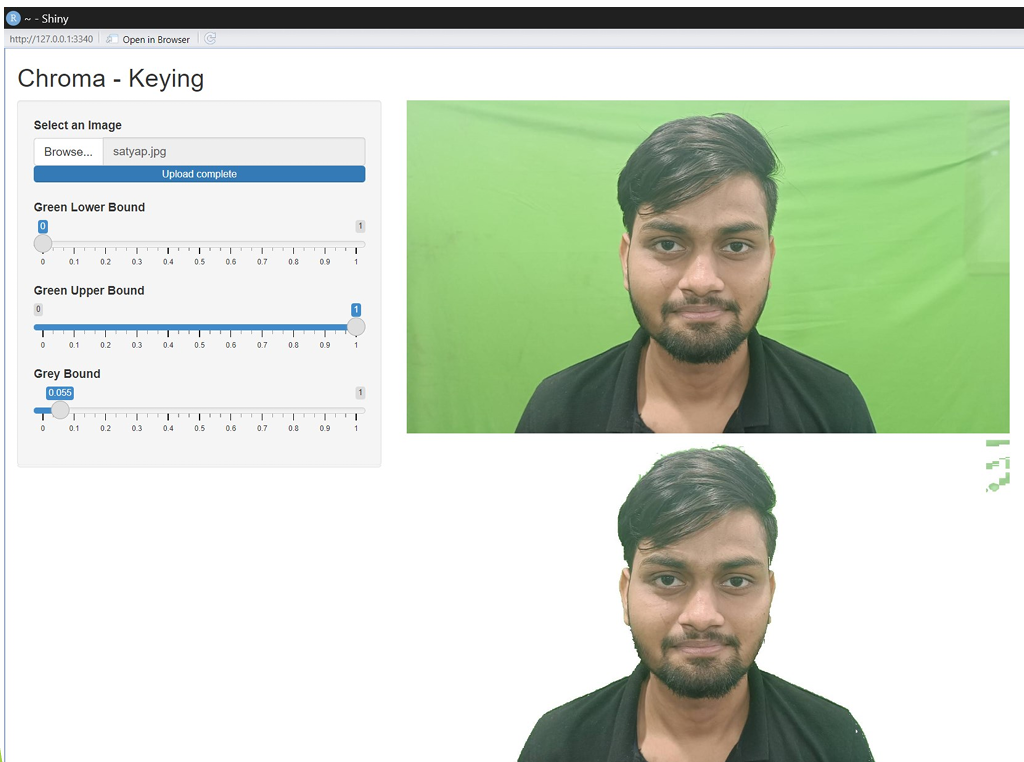
Step 1: Upload Your Image
Click “Select an Image” to upload a photo with a green-screen background.
For best results, ensure your source image is well prepared:
- Use even, consistent lighting across the green screen to minimize shadows.
- Stretch the green screen material tightly to remove wrinkles or creases.
- Keep the subject at a reasonable distance from the background to prevent green spill on clothing or edges.
- Avoid wearing green attire to prevent accidental removal of foreground regions.
- Maintain consistent camera and lighting settings if capturing multiple shots for one project.
- Use high-resolution images to preserve detail for more accurate keying.
Step 2: Adjust Keying Thresholds
The Shiny interface provides three sliders to control how aggressively the green screen is removed:
Green Lower Bound (threshold1):
- Sets the minimum intensity of green to be considered background.
- Start low for a solid green screen and increase gradually until unwanted areas disappear.
Green Upper Bound (threshold2):
- Sets the maximum green intensity for replacement.
- Useful when the background contains light green areas — you can preserve subtle tones or exclude them as needed.
Grey Bound (threshold3):
- Controls the tolerance for greyish pixels with some green component.
- This is crucial in the Grey Bound method to ensure neutral colors (like shadows or highlights on the subject) are not wrongly removed.
By experimenting with these sliders, users can fine-tune the algorithm for both uniform and complex green screens.
Step 3: Compare Original and Processed Images
- The left panel shows the uploaded source image.
- The right panel displays the result after chroma keying with the selected parameters.
- Changes appear instantly as you move the sliders, allowing real-time visual feedback.
Practical Tips for Better Results
- Solid Green Screens: Begin with a conservative Green Lower Bound and adjust upwards until the background vanishes cleanly.
- Complex Green Screens (shadows, mixed shades): Adjust both Green Lower Bound and Grey Bound to refine the removal and protect edge details.
- Prevent Spill: Ensure that light from the green screen does not reflect on your subject, as it may require more aggressive threshold tuning to clean up.
Observations and Key Insights
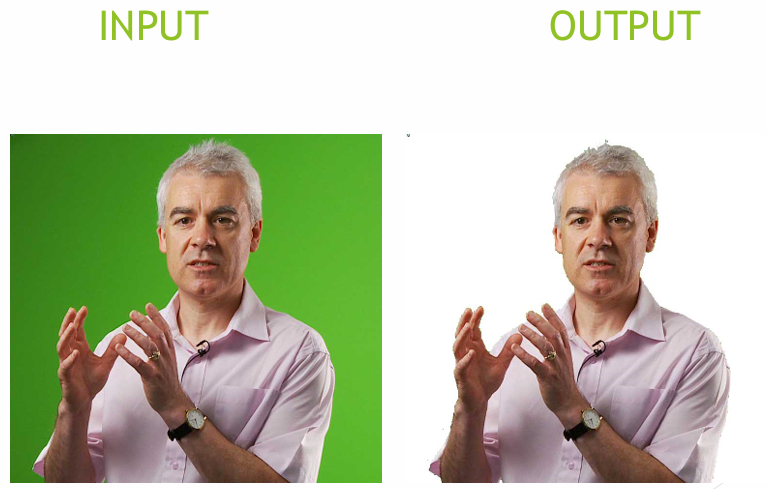
During the development and testing of our chroma keying algorithms, we made several practical observations about how different pixel properties and scene conditions affect the quality of background removal. These insights guided the refinement of our Grey Bound approach and highlighted both its strengths and areas for improvement:
Dominance of the Green Channel: Pixels that visually appear green almost always have a maximum value in the green component of their RGB triplet. This property provides a straightforward cue for background detection.
Role of Grey Pixels: When the red, green, and blue components of a pixel are nearly equal, the pixel appears as some shade of grey — ranging from black (low intensity) to white (high intensity). These neutral tones occur in shadows, highlights, and on the subject itself, making them tricky to handle without accidentally removing important details.
Impact of Green Screen Variability: A background with uneven green shades (due to poor lighting, wrinkles, or reflections) reduces algorithm performance. Variations make it harder to define a single threshold that cleanly separates foreground and background.
Color Spill at Edges: Even after keying, the edges of the foreground object often showed slight halos or discoloration. This is caused by color spill, where green light reflects onto the subject, contaminating border pixels.
Foreground–Background Contrast Matters: When there is a strong color contrast between the subject and background, chroma keying becomes easier and cleaner. Conversely, similar colors in clothing, props, or accessories cause the algorithm to misidentify parts of the subject as background — removing pixels that “appear even a little greenish.”
Limitations and Common Errors
Although the Grey Bound approach improved performance over simpler methods, we encountered recurring issues that affect the final quality of the composited images:
Edge Artifacts
- Pixel-by-pixel processing sometimes introduced jagged edges or halos around detailed subject outlines.
- These artifacts reduce the smoothness of the transition between the foreground and the new background.
Inconsistent Thresholding
- Because thresholds are user-configurable, different images require different settings.
- Users unfamiliar with chroma keying may find it difficult to select optimal values, leading to over-removal (parts of the subject disappear) or under-removal (green residue remains).
Selective Exclusion Challenges
- Simply identifying pixels with a strong green component is not enough for all lighting conditions.
- Shadows, reflections, or mixed lighting can produce pixels that should remain foreground but get incorrectly removed.
Handling Grey Pixels
- The Grey Bound method preserves neutral tones by tolerating pixels where R, G, and B are close.
- However, this also introduces complexities — in some cases, greenish-grey pixels crucial to subject details are mistakenly removed, while in other cases, unwanted background artifacts remain.
Conclusion
Our exploration of chroma keying led us through three distinct approaches, each revealing valuable insights and shaping our final solution. The process highlighted not only the technical aspects of color separation but also the practical considerations — such as lighting, equipment quality, and color consistency — that determine the success of any chroma keying pipeline.
Approach 1 (Min–Max Bound): This method relied on setting absolute RGB thresholds to remove the green screen background. While straightforward, it lacked the precision needed to handle varying shades of green and produced inconsistent results.
Approach 2 (Pixel Predominantly Green): By comparing green components against red and blue, this method showed better adaptability but struggled with real-world complexities such as lighting variations, color spill, and subtle foreground–background similarities.
Approach 3 (Grey Bound / Dynamic Thresholding): This final approach combined the strengths of previous methods and introduced a user-adjustable system for greater flexibility. By allowing thresholds to adapt dynamically, it effectively removed pixels where green dominated while preserving critical details. A special provision for handling pixels that appeared grey but had a slight green dominance further improved accuracy.
This progression reflects more than just algorithmic refinement — it embodies the learning process itself. Each iteration sharpened our understanding of chroma keying’s practical challenges: uneven lighting, color contamination at edges, and the trade-off between aggressive background removal and subject preservation.