Hindi Script Refinement & Improved OCR
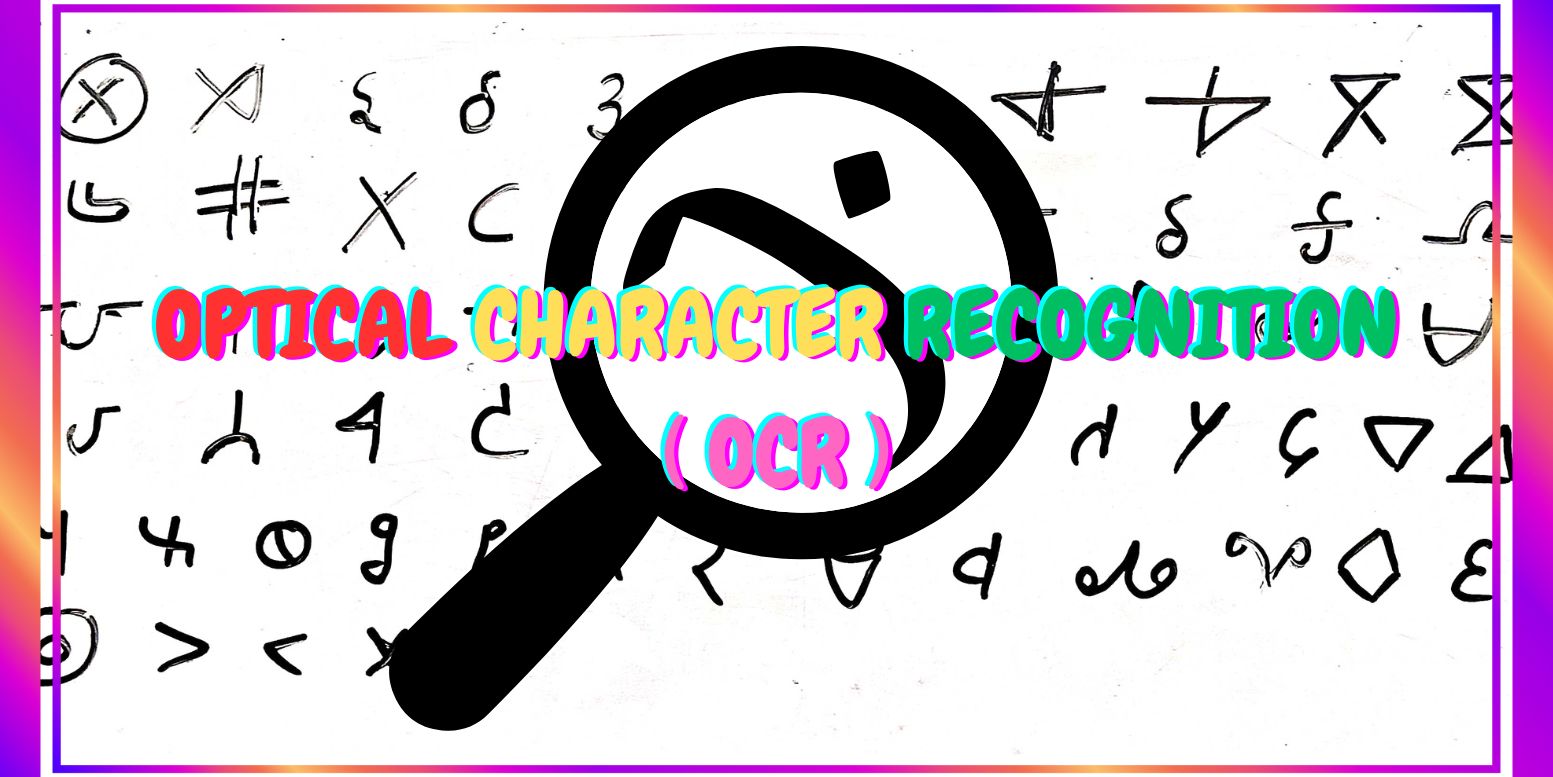
We want to come up with an alphabet (a set of symbols) that are mechanically distinguishable easily from scanned images (OCR) and are easy to write by hand. And hence develop an optical character recognition software for the same.
This was a group project I had done in the second semester at ISI Kolkata.
Enhancing Hindi Optical Character Recognition (OCR)
The Hindi language, one of the most widely spoken languages globally, poses unique challenges for optical character recognition (OCR) due to its complex script. While Hindi is rich in cultural heritage and widely used in literature, administration, education, and everyday communication, its intricacies present obstacles for mechanical interpretation.
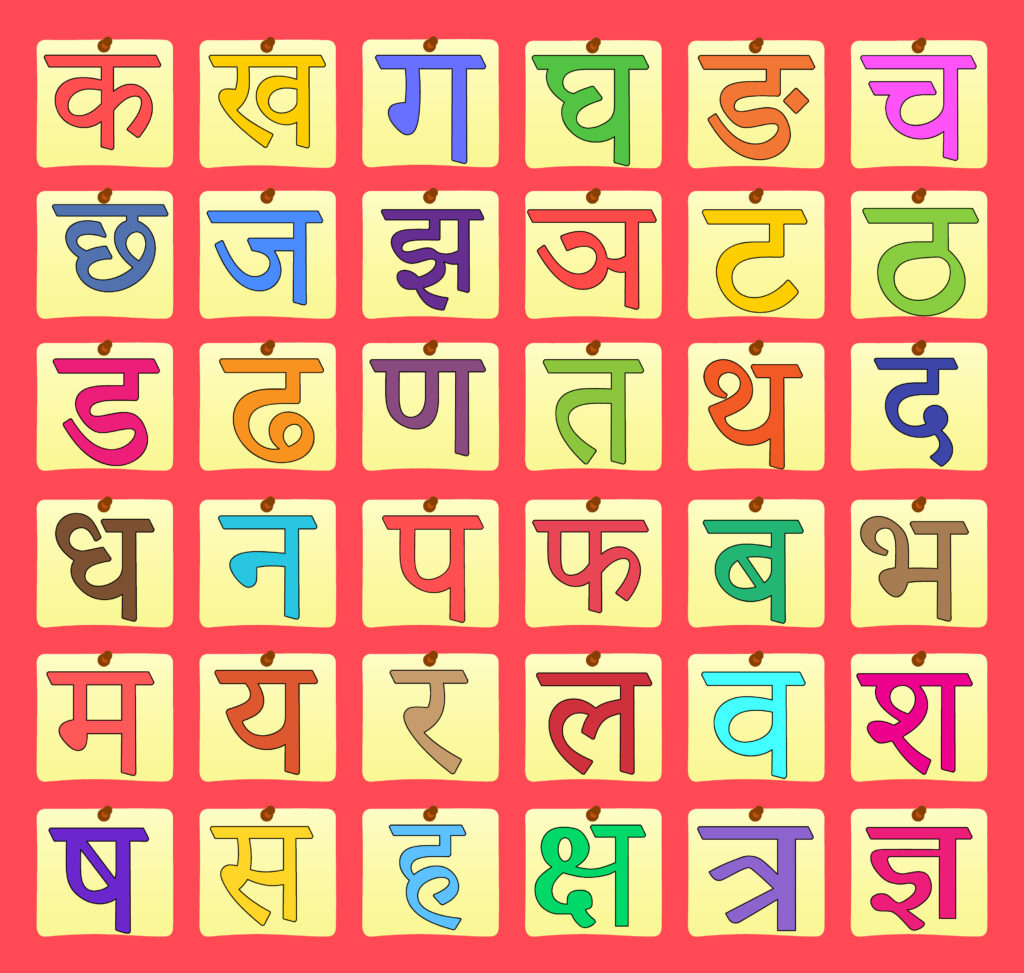
In this project, we address the challenges of OCR for Hindi by proposing a novel set of characters designed to enhance ease of writing and mechanical distinguishability. Recognizing the significance of simplicity in character design, we meticulously crafted a set of 60 symbols tailored to streamline both writing and OCR processes for Hindi.
We recognized that simply feeding handwritten Hindi to an OCR engine would be very error-prone. Instead, we took an unconventional approach: design a new “Hindi-like” alphabet that captures Hindi pronunciations but uses simplified, distinct shapes optimized for both handwriting and machine recognition. In other words, rather than trying to cope with all the quirks of Devanagari, we created a custom script that is easy for people to write quickly and unambiguous for an OCR system to classify. The motivation was to bridge the gap between analog Hindi handwriting and digital text: if we can train people (or a system) to write in this refined script, we can then reliably digitize it.
Alphabet Designing and Dataset Generation
Design Considerations
To address the intricacies of Devanagari, we carefully crafted a set of 60+ new Hindi symbols based on simple, geometric shapes. When designing these symbols, we followed key principles to ensure that each character is both easy to write and unambiguous for an OCR system to classify. These guidelines included:
- Simple Shapes: Utilize basic geometric shapes like lines, circles, squares, triangles, and combinations of these. Complex shapes or curves will be harder to distinguish in scans and write by hand.
- Distinctive Features: Each symbol should have distinctive features that make it easy to differentiate from others. This could include variations in shape, size, orientation, or strokes.
- Consistency: Maintain consistency in the design of the alphabet to ensure that each symbol is unique and recognizable. Consistent stroke width and proportions can aid in both writing and scanning.
- Limited Complexity: Keep the overall complexity of the alphabet low to make it easier to learn and remember. This also helps with both writing and scanning accuracy.
- Legibility: Prioritize legibility by avoiding symbols that are too similar or easily confused. Clear differentiation between characters is essential for both writing and scanning.
- Test and Refine: Test the alphabet with various handwriting styles and scanning methods to ensure that it meets the desired criteria. Make adjustments as necessary based on feedback and usability testing.
- Size Consistency: Maintain a similar size for all symbols to avoid confusion during interpretation.
- Scan Various Fonts and Handwritten Versions: Test our symbols by scanning different fonts of the regular alphabet and various handwriting styles. Refine the symbols to ensure they remain distinguishable in all scenarios.
- Conduct User Trials: Have different people, including those with varying levels of handwriting skill, test the ease of writing the symbols by hand. Based on their feedback, adjust the symbols for better writability.
We designed some (64) characters as alphabets as the first prototype before arriving at the final set of alphabets.

Training Data Collection
Using these custom symbols, a handwritten dataset was collected. Each of the 64 characters was written repeatedly by many volunteers to capture diverse handwriting styles. For example, multiple people wrote each symbol on paper, ensuring variations in stroke pressure and orientation.
This collection of samples forms the foundation for training. By covering a wide range of variations, the dataset helps the OCR model generalize to new inputs. All images were captured and processed with Python’s OpenCV to maintain consistency. The result is a robust training corpus where each symbol class is well-represented in many writing variants.
Data Augmentation
When training an OCR system, especially on a small custom dataset, one of the biggest problems is lack of variety. Even if you collect multiple handwritten samples per character, it’s almost impossible to capture all the natural variations in how people write — differences in position, stroke flow, slant, and pressure. If the training data is too uniform, the model performs well on “familiar-looking” inputs but fails when confronted with slightly different writing styles or scanning conditions.
This is where data augmentation comes in. Instead of collecting thousands of extra handwritten samples (which is slow and labor-intensive), we artificially create new, slightly modified versions of existing samples. These modifications preserve the identity of the character but introduce visual diversity, making the machine learning model more robust and less prone to overfitting.
For our Hindi script OCR project, we focused on three augmentation techniques, each carefully controlled so that characters remain legible and correctly labeled:
- Random Shifts: In real handwriting, letters are rarely perfectly centered in the image patch. People naturally write slightly to the left, right, up, or down — and segmentation can introduce small cropping errors. To simulate this, we applied small translations (up to ±2% of image width or height). If the classifier only sees perfectly centered characters during training, it might misclassify even a small off-center character during testing. By introducing controlled random shifts, we make sure our OCR system learns to recognize symbols regardless of exact placement.
- Curved Distortions(Rainbow / Inverted): Handwriting is rarely perfectly linear. Strokes can follow slight arcs, and when scanning or photographing, the paper itself can be curved. To mimic this, we applied column-wise vertical shifts based on a sinusoidal function. Curved distortions simulate how strokes might bend naturally or appear warped if the page isn’t flat. By training on these variants, the OCR system becomes tolerant to slight non-linearities in character shapes. By controlling the phase, we created two variants:
- Rainbow curve: strokes are pushed upward in the middle, like an arch.
- Inverted curve: strokes are pushed downward in the middle, like a valley.
- Sinusoidal Distortions: In addition to rainbow/inverted warps, we also applied a pure sinusoidal distortion where each image column is shifted up or down in a smooth, wavy pattern. This is a more general, less structured version of the curved distortion above. Sinusoidal distortions simulate oscillating pen motion or subtle scanner warps. They provide another dimension of variability while preserving the character’s overall structure.
By augmenting our dataset with these small, realistic distortions, we: Increased intra-class diversity, Reduced overfitting and Improved robustness. The transformations were intentionally small (2–5%) so they don’t alter the character identity. Each augmented image still represents the same label, ensuring consistent supervision during training.
SMOTE
Even after using data augmentation techniques (shifts, curves, sinusoidal warps) to generate new training images, our dataset still suffered from class imbalance. Some characters naturally had fewer samples than others — either because fewer people wrote them during data collection or because some shapes are simply underrepresented.
In machine learning, imbalanced datasets are dangerous:
- The classifier sees more examples of common characters, so it becomes biased toward predicting them.
- Rare characters are misclassified more often because the model doesn’t learn their features well.
- In KNN, each class “competes” in nearest-neighbor voting. If one class has 500 samples and another only has 50, the larger class dominates decision boundaries — since neighbors from larger classes are more numerous, they “outvote” minority classes during classification.
To solve this, we applied SMOTE (Synthetic Minority Over-sampling Technique).
SMOTE is a data-level balancing method used in supervised machine learning. Instead of simply duplicating minority class samples (which would lead to overfitting), SMOTE synthesizes entirely new data points by interpolating between existing samples of the minority class.
Here is how it works (conceptually):
- For each data point in an under-represented class, SMOTE finds its k nearest neighbors within the same class.
- It randomly selects one neighbor and generates a new synthetic point between the two by linear interpolation.
- This process repeats until the minority class has as many samples as needed to balance the dataset.
The outcome is a more diverse dataset with no duplicates, which “fills the gaps” in feature space and gives the classifier a richer understanding of the minority class. This approach is especially valuable when collecting more data is impractical or expensive. Instead of manually collecting more data, we can use SMOTE to create a more balanced dataset without introducing duplicates. This results in better generalization, improved recognition accuracy, and a more robust model. Since our dataset was relatively small, SMOTE proved to be an effective technique to boost performance without requiring large amounts of data or complex deep learning models.
Optical Character Recognition
To scan handwritten symbols and match them with your defined alphabet for detection, we employed Optical Character Recognition (OCR) techniques. Here’s a general approach to achieve this:
Preprocessing
In OCR, preprocessing is the stage that makes raw scans usable for all downstream steps (segmentation, feature extraction, classification). Good preprocessing dramatically simplifies segmentation (finding characters), stabilizes features (so HOG sees consistent edges), and ultimately improves accuracy. In our pipeline we treat preprocessing as a sequence of deterministic, reproducible transforms that convert a messy scan into a clean binary character image.
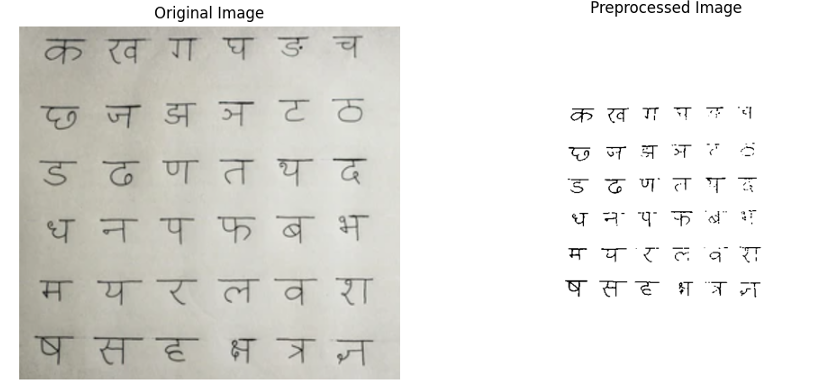
The main goals are:
- Normalize scale & geometry so all character patches have the same dimensions and orientation.
- Maximize signal-to-noise: enhance ink strokes, suppress background variation and scanner noise.
- Make segmentation robust: ensure characters are connected, isolated blobs for contour extraction.
Below are some of the steps involved in preprocessing:
Resize: Resizing the image is a fundamental preprocessing step that ensures all images conform to a consistent size. This uniformity is crucial for streamlining the processing pipeline, as it allows algorithms to handle images of varying resolutions and aspect ratios in a standardized manner. By resizing images to a predefined dimension (e.g., 16x16 or 8x8 pixels), computational complexity is reduced, which not only speeds up processing but also minimizes memory usage. This step is particularly beneficial when dealing with large datasets where images may vary significantly in size, ensuring that subsequent steps, such as feature extraction and recognition, are performed efficiently and effectively.
Adjust Brightness and Contrast: Adjusting brightness and contrast is essential for enhancing the visibility and legibility of text within an image. Brightness adjustment modifies the overall lightness or darkness of the image, ensuring that text is neither too faint nor too overwhelming. Contrast adjustment, on the other hand, amplifies the difference between light and dark regions, making text stand out more prominently against the background. This step is particularly useful for images that are poorly lit or have low contrast, where text may blend into the background. By improving these visual aspects, the OCR system can more accurately detect and interpret characters, leading to better recognition results.
De-skew: De-skewing is the process of correcting the tilt or rotation in an image to ensure that text lines are horizontally aligned. Misaligned text can significantly reduce OCR accuracy, as algorithms expect characters to follow a straight baseline. To achieve de-skewing, techniques such as the Hough Transform are applied to a Canny edge-detected image. The Hough Transform identifies lines within the image, and the angle of these lines is used to determine the degree of rotation needed to align the text properly. Once the angle is calculated, the image is rotated to correct the skew. This step is critical for ensuring that text is properly aligned, which is a prerequisite for accurate character recognition.
Thresholding/Binarization: Thresholding is a process that converts a grayscale or color image into a binary image, where pixels are either black or white. This simplification is achieved by first converting the image to grayscale to eliminate color information, which is often unnecessary for text recognition. Then, an adaptive thresholding technique such as Otsu Thresholding is applied. Otsu’s method automatically determines the optimal threshold value by analyzing the pixel intensity distribution, ensuring that text is clearly separated from the background. This binary conversion enhances the contrast between text and non-text regions, making it easier for OCR algorithms to isolate and recognize characters accurately.
Noise Removal: Noise removal is a critical preprocessing step that focuses on eliminating irrelevant details and artifacts from an image, which can otherwise interfere with OCR accuracy. Noise can manifest as speckles, dust, or random pixels that distract the OCR system. To address this, morphological operations such as erosion and dilation are applied to remove small noise particles. Additionally, filters like the median filter or Gaussian filter are used to smooth the image while preserving the edges of the text. These filters effectively reduce noise without blurring the text, ensuring that the OCR system can focus on the relevant features of the image. By removing noise, the clarity and legibility of the text are significantly improved, leading to more accurate recognition.
Erosion and Dilation: Erosion and dilation are morphological operations that play a vital role in refining text regions within an image. Erosion works by shrinking the boundaries of text regions, which helps in breaking apart connected characters and removing small artifacts that might interfere with OCR. Conversely, dilation expands the boundaries of text regions, which is useful for connecting broken parts of characters and filling in small gaps within the text. These operations are particularly effective in improving the connectivity of text while removing unwanted noise. By carefully applying erosion and dilation, the preprocessing step ensures that text regions are well-defined and free from artifacts, thereby enhancing the overall accuracy of the OCR process.
Segmentation
Once we have a clean, binarized image after preprocessing, the next challenge is finding and isolating individual characters. In OCR, this step is called segmentation. A classifier like KNN can only recognize one symbol at a time — so before classification, we must split a full line or block of handwritten text into single-character image patches.
Segmentation is critical because even the most accurate model will fail if the input contains multiple touching symbols, partial strokes, or too much background. If segmentation fails, multiple characters may be merged into one region, or strokes of a single character may be split apart. Either case would confuse the classifier and hurt OCR accuracy. A well-tuned segmentation stage ensures one contour corresponds to one character nearly every time, giving the recognition model clean, consistent input. Our approach uses contour detection and bounding boxes, a proven method for isolating connected components in binary images.
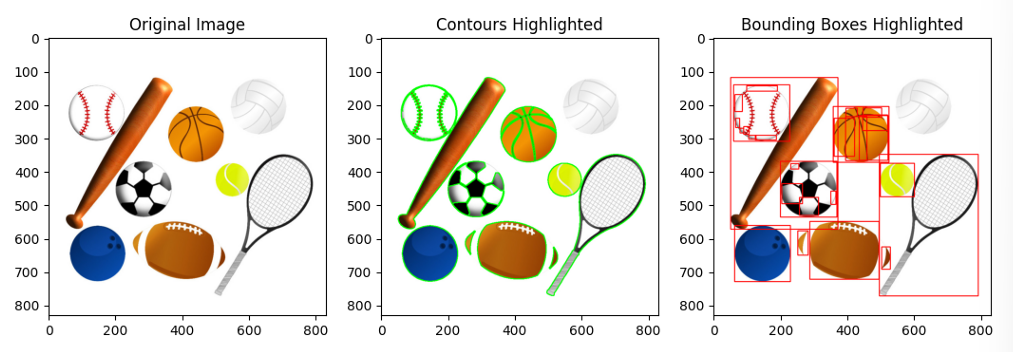
A contour is essentially the boundary that outlines a connected region of pixels with uniform intensity. In the context of our OCR pipeline, after the preprocessing and thresholding stages, the image is converted into a binary format. Here, the foreground—representing the character strokes—appears as white regions with a pixel value of 255, while the background is black with a pixel value of 0. This clear distinction allows a contour-finding algorithm to trace the outline of each connected white region. Under ideal conditions, each detected contour corresponds to a single character, making it a reliable method for character segmentation. There are different algorithms for contour detection, each suited for specific scenarios. The Suzuki algorithm, which is the default in OpenCV, is highly efficient at finding hierarchical contours, making it ideal for complex images.
The decision to use contour detection is based on several advantages. Firstly, contours are computationally efficient and easy to implement using OpenCV’s cv2.findContours function. This method is particularly effective for binary images, where characters are well-separated from the background and each other after preprocessing. Additionally, contours provide both the shape of the character, defined by the outline points, and its spatial position, given by the bounding box, all with minimal computational effort.
Contour Detection Once an image is binarized (black background, white strokes), a contour detection algorithm scans it to find all connected white regions. A contour is a closed curve that follows the boundary of a region with uniform intensity. In a binary image, characters appear as continuous white blobs, and the contour is simply the edge surrounding each blob. This step gives us a list of candidate regions that might represent characters. However, not all contours are valid characters — some may be noise or small specks introduced during scanning.
Bounding Boxes Once contours are identified, each one is enclosed within a bounding box — a rectangle just large enough to contain the entire contour. Bounding boxes localize characters precisely and separate them from the rest of the image. This makes it easy to “cut out” individual symbols, giving each character its own image patch. Any boxes that are too small are likely just noise and are discarded. Similarly, unusually large boxes (covering entire words or lines) indicate segmentation errors and must be handled separately. In written Hindi, characters are read left to right. Once all bounding boxes are extracted, sorting them by horizontal position ensures that segmented symbols appear in reading order, preserving the logical sequence of text.
Character Extraction After bounding boxes are finalized, the next step is isolating each character image:
- Cropped patches: The region inside each box is cut out to form a clean image containing only that character.
- Normalization: Each patch is resized to a fixed dimension (for example, 30×30 pixels) so the classifier later sees every input in the same format.
- Clean storage: These cropped, normalized patches are saved — in training, they become labeled data for the classifier, and during OCR inference, they become the actual inputs to be recognized.
This segmentation step is crucial for building the dataset and essential during prediction. By ensuring that every input sample contains just one symbol, we make the later stages (feature extraction and classification) much more reliable.
Feature Extraction - HOG
When individual characters are segmented from an input image, the next step is to represent these characters in a format that machine learning algorithms can interpret effectively. Unlike humans, who can easily recognize characters regardless of minor variations, computers rely on raw pixel intensities. Directly feeding these pixel values into a classifier, such as K-Nearest Neighbors (KNN), is often ineffective. Small changes in handwriting, such as a slight tilt, thicker stroke, or minor curve, can significantly alter pixel values, even though the character remains recognizable to humans.
To address this challenge, we need to extract features that capture the essential shape of a character while ignoring irrelevant details like noise or minor variations. This is where the Histogram of Oriented Gradients (HOG) comes into play. The Histogram of Oriented Gradients (HOG) is a feature descriptor widely used in computer vision for shape and object recognition. Instead of using raw pixel intensities, HOG represents an image by looking at how the brightness changes — i.e., the gradients — and where those changes are directed.
- Gradients indicate edges and stroke directions, which are fundamental to recognizing characters.
- By summarizing these gradients in a structured way, HOG captures the outline and texture of symbols while ignoring exact pixel values.
- This makes it robust to small distortions, translations, or variations in handwriting style.
- A character image (e.g., 64 pixels) can be reduced to a few hundred meaningful HOG features, which KNN can handle efficiently.
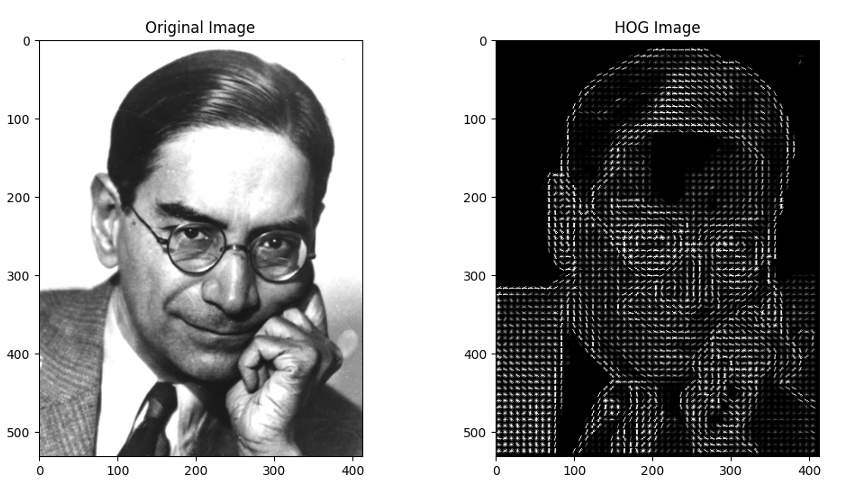
By using HOG, we can effectively transform the visual information of handwritten characters into a structured numerical format that machine learning algorithms can process, leading to more accurate and reliable OCR results.
Training: Classification with K-Nearest Neighbors (KNN) algorithm
Once each segmented character is transformed into a feature vector using HOG, the next step is classification — determining which symbol the feature vector represents. Unlike deep learning models that learn highly complex representations, K-Nearest Neighbors (KNN) is a simple yet powerful algorithm that relies entirely on the geometry of data in feature space.
Even after using HOG, which gives us a structured description of a character’s strokes, we still need a way to map these numerical features to actual symbols. For example, one character’s HOG vector may look like [0.12, 0.47, ...] while another’s looks like [0.85, 0.33, ...]. The challenge is to assign a label (“अ”, “आ”, etc.) to any new input vector that the OCR system encounters. KNN is an intuitive solution because it makes decisions based on similarity to previously seen examples, without assuming any explicit mathematical model.
Concretely, each character image’s HOG vector is compared (using Euclidean distance) to all training vectors. (Each image is represented as a vector in a high-dimensional feature space.) The character is assigned the label most common among its K nearest neighbors. For example, if K=5 and three of the five nearest training samples are labeled as “अ” (and two as “आ”), then the unknown image is classified as “अ”. This method leverages the fact that similar handwritten characters cluster together in HOG space.
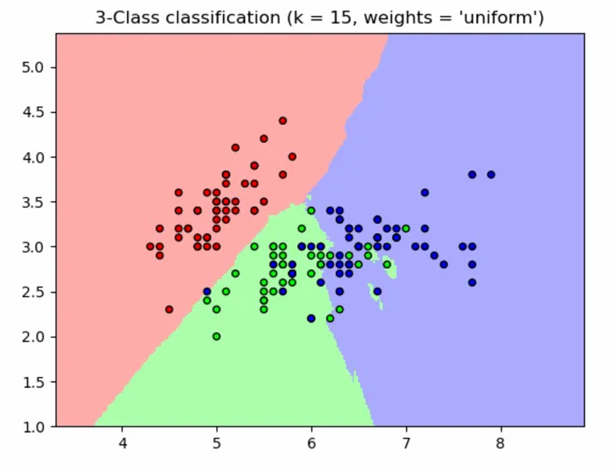
KNN was chosen for its simplicity and effectiveness on this relatively small, well-defined dataset. KNN performs well in such cases, where decision boundaries are clear. Unlike neural networks that require complex optimization, KNN only stores the feature vectors and labels. “Training” is essentially just saving the dataset, making it fast to set up. In practice, this approach achieved good recognition rates without the need for complex modeling.
Considerations and limitations:
- Choice of K: If K is too small (e.g., K = 1), the classifier may overfit to noise. If it is too large, dissimilar classes might get mixed. Typically, K is chosen via cross-validation.
- Computational cost: KNN must compare a test sample against all training samples, which can be slow if the dataset grows very large. However, for our project’s dataset size, this was not an issue.
- Distance metric: While Euclidean distance works well with normalized HOG vectors, other metrics (like Manhattan distance or cosine similarity) can sometimes yield better results depending on the data distribution.
Model Serialization with Joblib
The KNN classifier used in our OCR system stores a full reference dataset of feature vectors and labels. This means that every time we want to run OCR, we need to reload the model. To avoid retraining the model every time, we use serialization to store the model to disk and load it later. Serialization is the process of converting an object into a format that can be written to disk. By using serialization, we can simply load the pre-trained model and use it for prediction, skipping the need to retrain the model every time we want to run OCR. This makes it much easier to move from experimentation to production.
Joblib is a Python library designed for serialization and deserialization — the process of saving Python objects to disk and loading them later. In machine learning, serialization allows us to:
- Store trained models in a file.
- Reload them instantly in future sessions.
- Deploy them to different machines without rerunning the entire training pipeline.
How it integrates with the pipeline:
- After training, we dump the KNN model using Joblib:
- This file now contains all feature vectors and their labels.
- During OCR inference:
- The program imports Joblib.
- It loads model.joblib directly into memory.
- Preprocessed, segmented character images are converted to HOG features.
- The loaded KNN model predicts their labels instantly.
This process eliminates redundant computation and ensures consistency between training and prediction phases.
End-to-End Pipeline
After building and refining each component individually, the final OCR system works as a single streamlined pipeline. From input to output, the process looks like this:
| |
This flow ensures that every stage outputs exactly what the next stage needs — no manual intervention required once the system is running. The result: a fully functional OCR pipeline that takes raw handwriting as input and produces structured, machine-readable text as output.
Now that the pipeline is complete, the next logical step is to evaluate its performance — to analyze how well it recognizes characters, identify sources of error, and measure overall accuracy.
Results and Evaluation
Let’s now test the OCR pipeline on an image. We’ll use the original character image as input. If the model is good enough, it should generate a similar image. Here are the results:
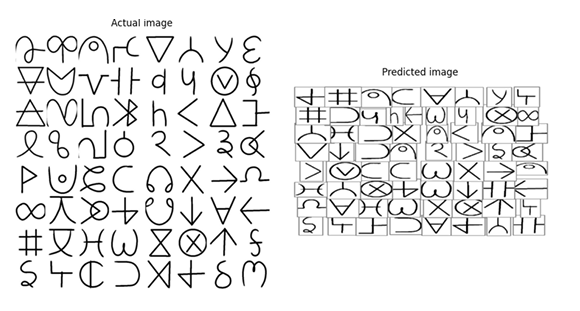
As you can see from the example output, the predictions aren’t perfect. Many glyphs are misclassified or placed awkwardly on the page. This is expected given the prototype nature of the system and the constraints we faced earlier (limited real handwriting samples, some segmentation failures, the simplicity of HOG features and KNN, and the reliance on relatively mild augmentations). We’ll discuss the detailed reasons for these errors and concrete remedies in the Further Improvements section. For now, let’s focus on evaluating the model’s performance.
After training and deploying the OCR pipeline we quantitatively evaluated performance on held-out data using two standard tools: the confusion matrix and the classification report (precision / recall / F1 / support). These measures tell us not only how often the system is right, but how and where it fails — information that is essential for targeted improvements.
1. Confusion Matrix: Insights and Observations
A confusion matrix is a powerful tool for evaluating classification performance. It displays true classes on one axis and predicted classes on the other, with each cell showing how many times a true class was predicted as another class. In an ideal scenario, the confusion matrix would be perfectly diagonal, indicating that every instance was predicted correctly.
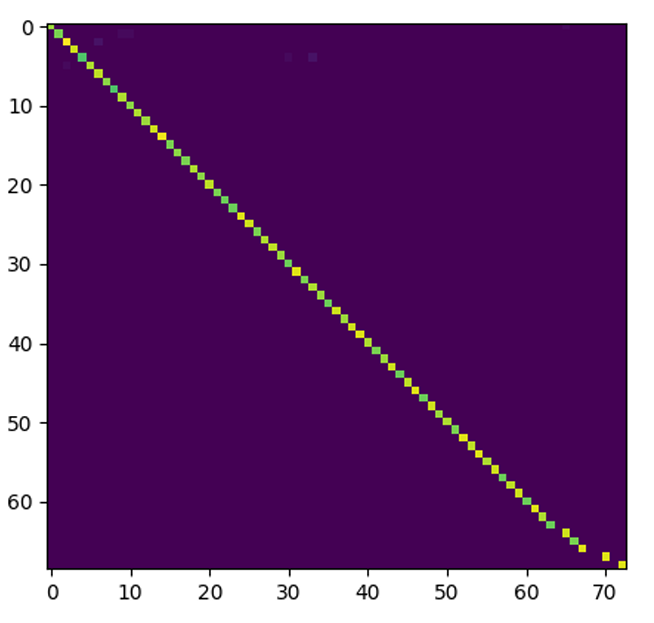
What We Observed:
- The confusion matrix for our model is strongly diagonal, meaning most classes lie on the diagonal with high counts. This indicates that the majority of characters are recognized correctly.
- Interpretation: A largely diagonal matrix suggests that our pipeline—preprocessing → HOG feature extraction → KNN classification—produces highly separable clusters for most of our custom glyphs in feature space. This confirms that our character design, dataset augmentation, and feature extraction are working effectively together.
Off-Diagonal Insights:
- The few non-zero off-diagonal cells are particularly valuable. They highlight systematic confusions between specific pairs or small groups of glyphs, indicating where improvements are needed.
2. Classification Report: Precision, Recall, F1-Score, and Support
The classification report provides a detailed summary of per-class metrics:
Precision = TP / (TP + FP)
- High precision means that when the model predicts a class, it is usually correct (few false positives).
Recall = TP / (TP + FN)
- High recall means the model finds most real occurrences of that class (few false negatives).
F1-Score = Harmonic mean of precision and recall.
- It balances both precision and recall into a single metric, giving a more robust measure of model performance.
Support = Number of true instances in the test set for that class.
- Low support reduces confidence in the class metrics, as the results may not be statistically significant.
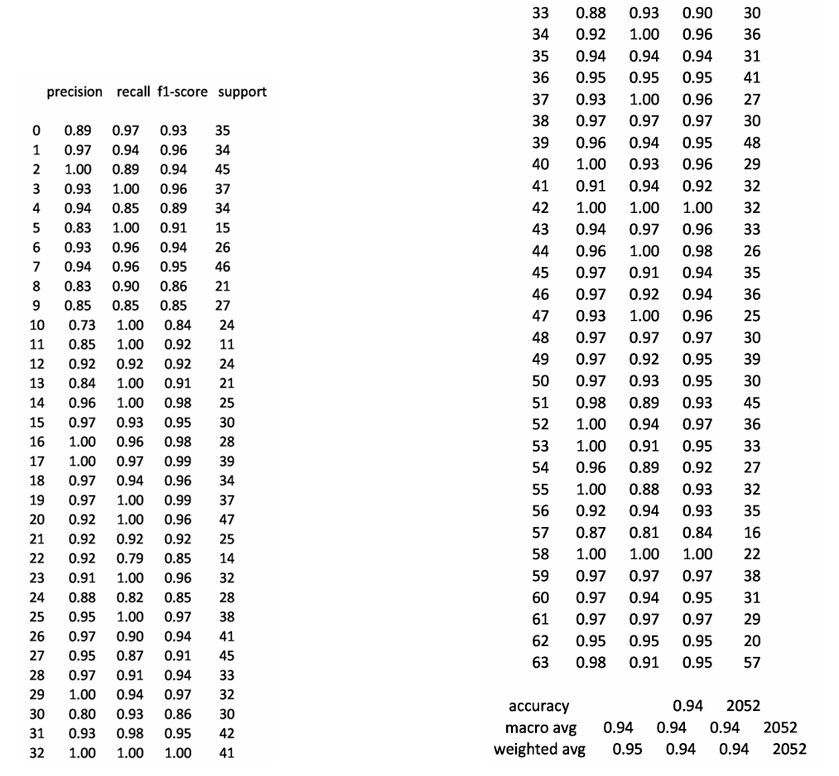
Key Takeaways:
- Our model achieves an overall accuracy of 90–95% on isolated characters, which is promising given the novelty of our alphabet and the variability in handwriting.
- Many classes exhibit both high precision and recall, indicating strong and reliable recognition.
- Some classes show imbalanced precision/recall:
- Low precision, high recall: The model is over-predicting that class (too many false positives). Possible fixes include tightening decision boundaries (e.g., adjusting ( K ) or using distance weighting in KNN).
- High precision, low recall: The class is either underrepresented or too narrowly modeled (too many false negatives). Solutions include adding more augmented samples (e.g., using SMOTE) or collecting additional handwriting examples for that class.
The near-diagonal confusion matrix and the ~90–95% isolated-character accuracy show that the combination of careful glyph design, controlled augmentation, HOG features, SMOTE balancing, and KNN classification is a strong baseline for this custom script. The fact that we could build an OCR system for a custom script with less than a thousand training examples is a testament to the power of careful design and clever engineering. Of course, there are many ways to improve this system, which we shall discuss now.
Limitations and Future Work
We built a working OCR pipeline for our custom Hindi-like alphabet and got encouraging results, but the system has clear limits. Below I list the most important shortcomings, explain why they matter, and give concrete, prioritized next steps we can take to improve each one. Wherever helpful I add practical experiments you can run and metrics to watch.
1. Feature Representation (HOG Only)
Limitation: HOG is a robust and interpretable descriptor, but as a hand-crafted feature, it captures only basic edge and gradient information. It may miss subtle, high-order shape cues such as curvature, local stroke junctions, and variations in pen pressure that are critical for distinguishing diverse handwriting styles. HOG is effective for our current system because it focuses on edges and stroke directions, which are fundamental to character recognition. It provides a strong baseline by summarizing gradient information in a structured way, making it resilient to minor distortions and variations in handwriting. However, its reliance on predefined gradient bins and cell structures limits its ability to capture more complex patterns that could further improve accuracy.
Future Work:
- Add Complementary Features: Incorporate zoning histograms, projection profiles, and shape moments alongside HOG to capture more nuanced shape information.
- Explore Learned Features: Train a small Convolutional Neural Network (CNN) or use transfer learning with a pre-trained model (e.g., ResNet) to automatically learn more discriminative features.
- Metric Learning: Implement triplet loss or Siamese networks to create embeddings where similar glyphs cluster tightly, improving KNN performance.
2. Dataset Size and Diversity
Limitation: Our dataset contains a relatively small number of real handwriting samples per glyph. While data augmentation helps, synthetic variations cannot fully replicate the diversity of real handwriting styles, pen types, and artistic variations. The current dataset, combined with augmentation, provides sufficient coverage for basic recognition tasks. However, the limited diversity means the model may struggle with rare or highly stylized handwriting that wasn’t adequately represented during training.
Future Work:
- Collect More Real Samples: Aim for a broader and more diverse dataset, targeting at least 1,000 images per glyph through crowdsourcing or controlled data collection.
- Smart Augmentation: Focus on generating targeted augmentations for weak classes, particularly those identified in the confusion matrix as prone to errors.
- Synthetic Data Generation: Use Generative Adversarial Networks (GANs) to create realistic handwriting variants, filling gaps in style and pen pressure patterns.
3. Character-Level Focus (Limited Sequence Capability)
Limitation: The current system is designed to recognize individual glyphs in isolation, which limits its ability to handle connected handwriting, ligatures, or full words where characters touch or overlap. Isolating and recognizing single characters simplifies the problem and works well for segmented input. However, real-world handwriting often involves contiguous strokes, conjunct characters, and contextual dependencies that are not captured by character-level analysis.
Future Work:
- Line and Word Detection: Implement techniques like horizontal/vertical histogram projection and connected-component analysis to detect and segment lines and words.
- Sequence Models: Adopt segmentation-free approaches such as CNN + Connectionist Temporal Classification (CTC) to directly predict sequences of characters.
- Language-Aware Decoding: Integrate lexicons or character-level language models to convert raw symbol sequences into valid words, reducing errors and improving usability.
4. Segmentation Robustness (Touching Glyphs, Broken Strokes)
Limitation: The contour-based segmentation method struggles when glyphs touch or when strokes are broken or merged incorrectly. This leads to errors in feature extraction and classification. Contour-based segmentation is effective for well-separated characters but fails in cases of overlapping or connected strokes, which are common in natural handwriting. This limitation propagates errors through the entire pipeline.
Future Work:
- Improve Morphological Operations: Fine-tune kernel sizes and adaptive operations to better handle variations in image brightness and stroke connectivity.
- Advanced Segmentation Techniques: Use watershed segmentation with markers or train a small U-Net model to predict character masks and boundaries more accurately.
- Validation Metrics: Introduce segmentation precision and recall metrics to quantify and improve the accuracy of glyph separation.
5. Classifier Scalability and Alternatives
Limitation: K-Nearest Neighbors (KNN) is simple and effective for moderate-sized datasets but becomes computationally expensive as the dataset grows. It is also sensitive to noisy features and requires careful scaling of data. KNN is easy to implement and works well with HOG features for our current dataset size. Its non-parametric nature allows it to adapt to variations in the data without extensive training. However, its reliance on distance metrics makes it less efficient for large-scale applications.
Future Work:
- Explore Alternative Classifiers: Experiment with Support Vector Machines (SVM) with RBF kernels or Random Forests, which may offer better robustness and efficiency.
- Lightweight CNN: Train a small CNN for end-to-end learning, which can outperform KNN on image tasks while being fast at inference.
- Approximate Nearest Neighbors: If KNN is retained, switch to libraries like FAISS or Annoy to speed up nearest neighbor searches at scale.
Conclusions
This project reimagined Hindi OCR by designing a custom alphabet optimized for both handwriting ease and machine readability. By simplifying character shapes and ensuring distinct visual features, we created a script that balances human usability with computational efficiency.
We built a modular OCR pipeline combining:
- Preprocessing (deskewing, denoising, thresholding)
- HOG feature extraction (capturing stroke directions)
- KNN classification (trained on augmented handwritten samples)
The system achieves 90–95% accuracy on isolated characters, with a small set of predictable confusions. This proves that co-designing handwriting and recognition can yield high-quality OCR without heavy computational demands.
Next Steps:
- Expand the dataset (real handwriting + GAN-generated samples)
- Upgrade features (CNNs, metric learning)
- Extend to words/lines (sequence models + language post-processing)
- Add human-in-the-loop (confidence scoring + correction UI)
This work lays the foundation for a practical Hindi OCR tool, demonstrating that a well-designed alphabet and a transparent pipeline can bridge handwriting and digital text—paving the way for broader accessibility.