First Open Source Contribution
Open source is a place where people from all over the world work together on code, a place for experienced developers, I wasn’t sure I belonged there. But then, in January 2025, I made my first contribution and merged my first pull request (PR) and that changed everything for me.
This isn’t just my success story—it’s a guide for anyone who wants to make their first first contribution to open source. I’ll show you how I went from a beginner to someone who could contribute. Let’s get started!
Why Open Source? The Spark That Ignited My Journey
After writing my ‘Complete Guide to Open Source’ and ‘Crack Google Summer of Code (GSoC)’ blogs, I knew a lot in theory but really wanted to try it out. To me, open source was a great way to practice my skills, meet other developers, and create something others could use. I was desperate to get my hands dirty. I wanted my first PR to truly mean something – not just be a trivial typo fix. My determination was simple: learn by doing, even if it meant navigating entirely new concepts.
Discovering My First Challenge: The piQture Project
Landing on SaashaJoshi/piQture wasn’t an accident; it was a deliberate search guided by the very advice I’d shared with others.
How I Found piQture
I used GitHub’s search to find projects. I searched for projects using Python, which I knew, and looked for ones with a good first issue label, which means they’re beginner-friendly. I also saw the hacktoberfest label, which is for a coding event in October.
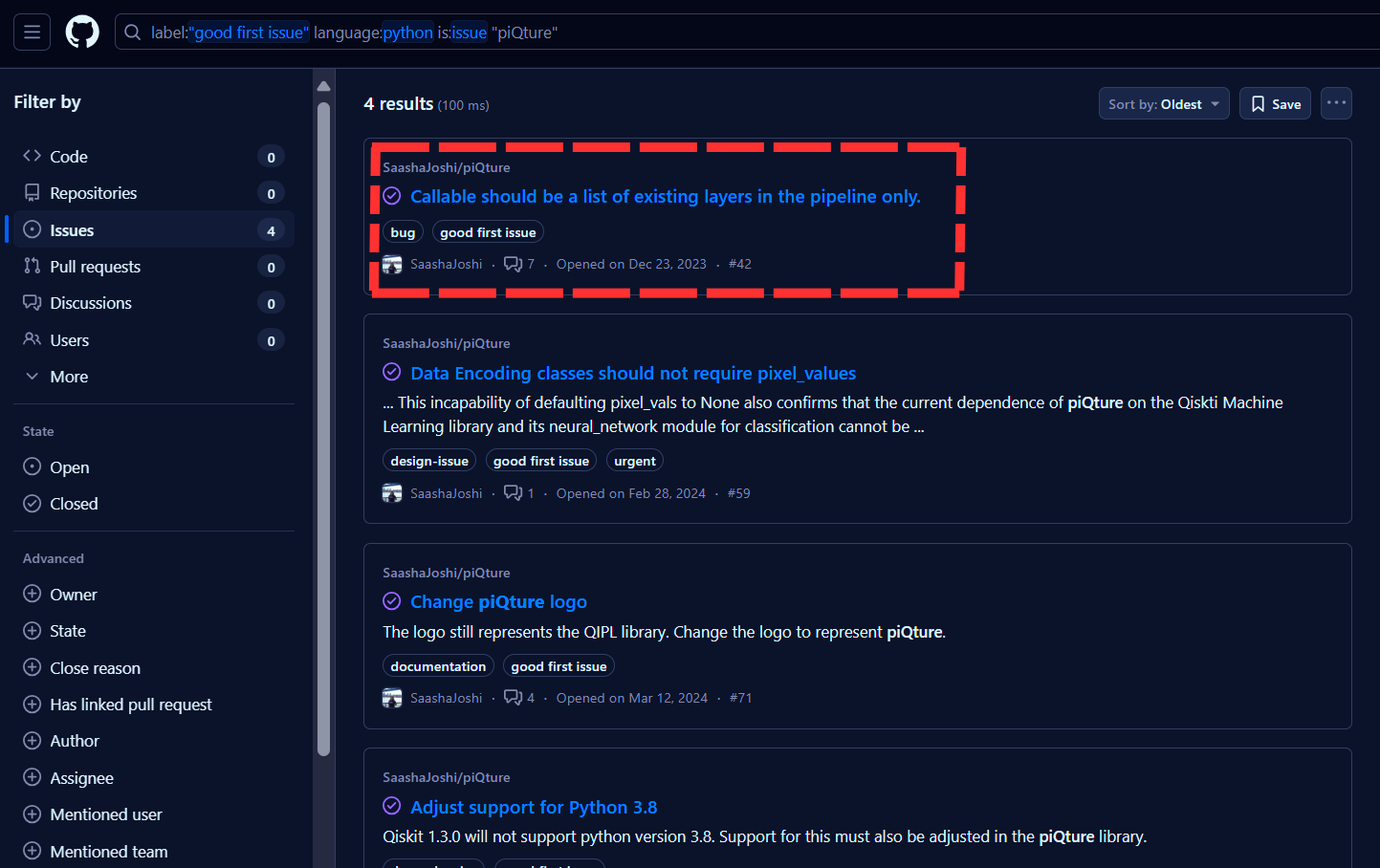
That’s when piQture popped up – a promising Python library dedicated to quantum image processing. I immediately clicked through to its repository. My initial exploration involved:
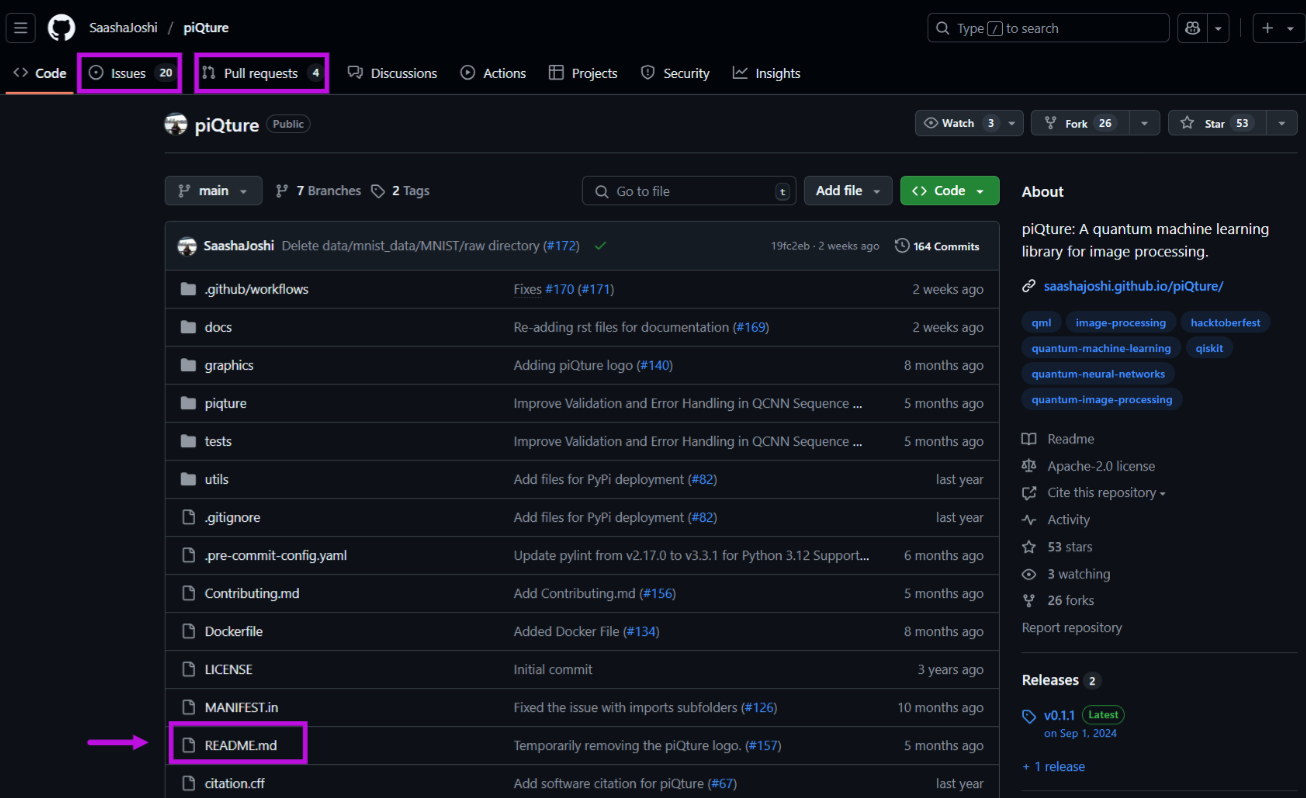
- Reading the
README.md: It’s like the project’s introduction. I checked how to set it up and what the project was about. - Browsing the
Issuestab: It showed me what problems people were talking about and what needed fixing. - Peeking at
Closed PRs: This helped a lot! I saw how the maintainers talked to new contributors, which told me how friendly the community was. I feltpiQturewas welcoming, and the maintainer, Saasha, seemed helpful.
Why This Repo and Issue? The Perfect Fit
Choosing piQture and specifically Issue #42 wasn’t random. I chose it for three reasons:
- Interest: I’m really fascinated by quantum computing, and this project let me work on it using Python, which I knew. It felt exciting to try.
- Beginner-Friendly (but Challenging!): Issue #42, called ‘Improve Validation and Error Handling in QCNN Sequence Method,’ seemed just right. It wasn’t too easy, like fixing one line, but it also didn’t need me to be an expert in quantum physics. I thought it was a good way to make a real contribution without feeling too hard.
- Community Vibe: I saw that Saasha, the maintainer, was helpful and kind in the comments. As a beginner, I needed a friendly community to guide me.
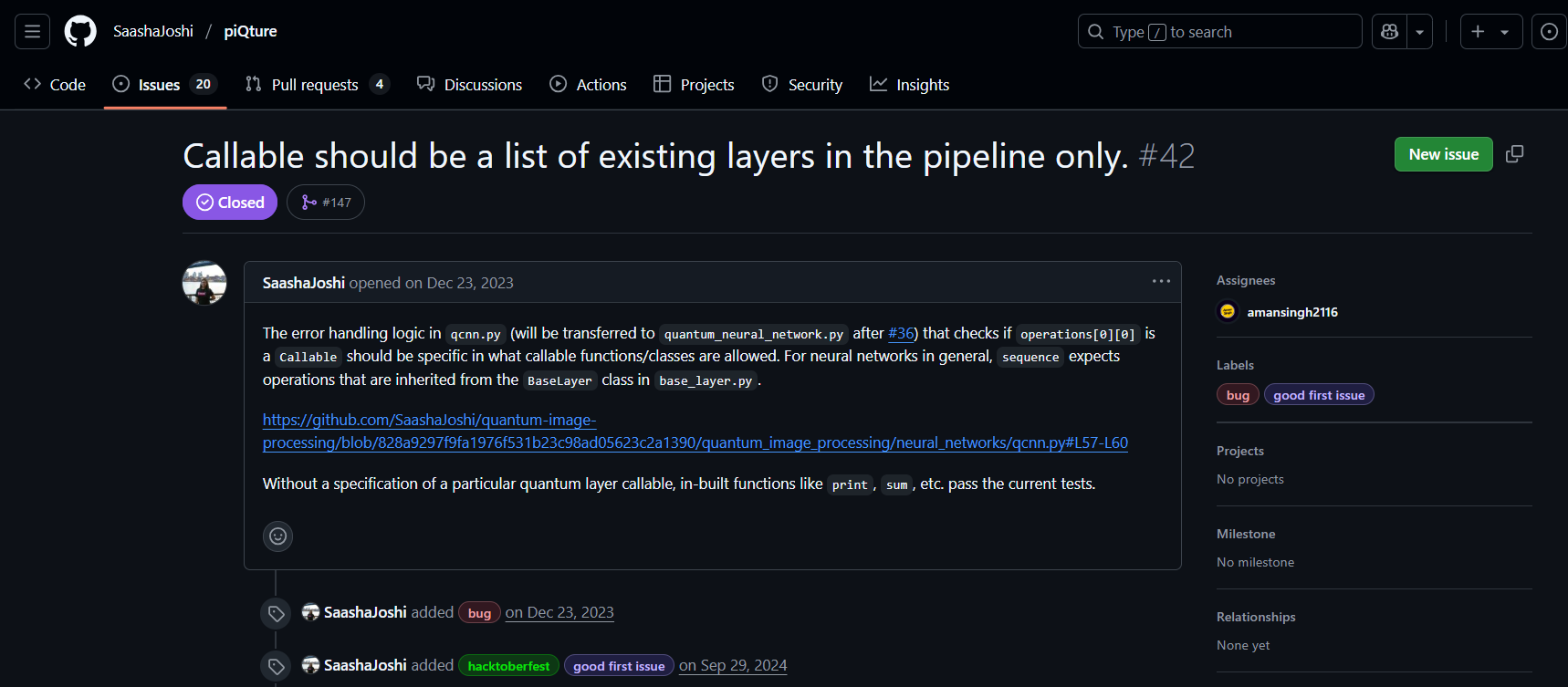
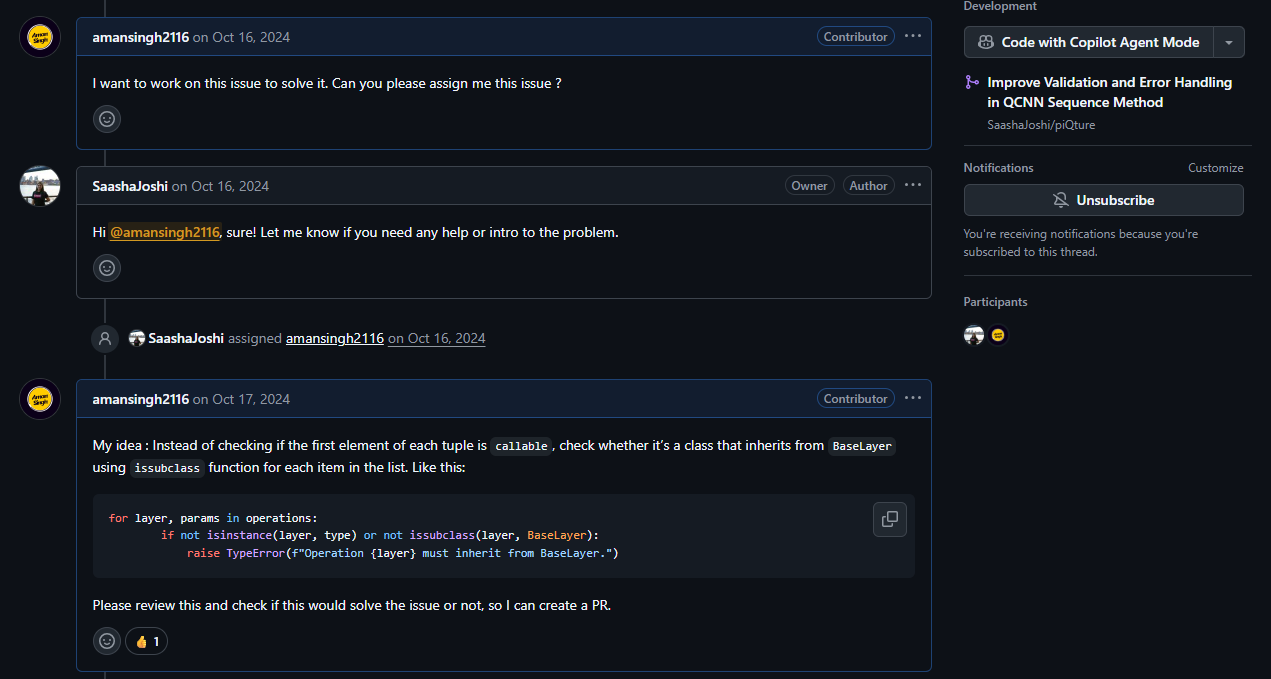
Issue #42 was about adding checks to a part of the code called the QCNN class’s sequence method. I had to make sure only the right kinds of inputs, called ’layers,’ were allowed by checking if they were proper classes and related to BaseLayer. It was a good way to test my problem-solving skills and work on something new and interesting. So I commented on the issue to say I’d like to work on it.
My AI Co-Pilots: ChatGPT and Claude
I didn’t do this all by myself. I used AI tools like ChatGPT and Claude to help me, almost like having a tutor.
At first, I asked them to explain things I didn’t understand, like how quantum neural networks work or how to use Python’s issubclass() function, which I needed for my code. Later, when I had trouble writing patterns for my tests (called regex), Claude helped me make ones like r'Operation at index \d+ must be a class'.
They weren’t always right; sometimes their answers were too general or even a bit wrong. But they gave me a place to start, which saved me a lot of time. I learned to use their ideas as a starting point and then adjust them myself, which helped me trust my own skills and understand the problem better. They helped me learn, but I still had to figure things out myself.
The Journey: From Idea to Merged Code (A Step-by-Step Guide for Beginners)
Step 1: Fork the Repository – Your Personal Sandbox
What I Did: I went to the
SaashaJoshi/piQturerepository on GitHub and clicked the ‘Fork’ button at the top right. This made a copy of the project in my GitHub account, calledamansingh2116/piQture.Why: Forking is like making your own copy of the project. You can change things, try stuff out, and even mess up without changing the original project. You only share your changes with the original project when you’re ready.
Step 2: Clone Locally – Bringing the Code to Your Machine
Once I had my fork, the next step was to bring that code from GitHub onto my personal computer.
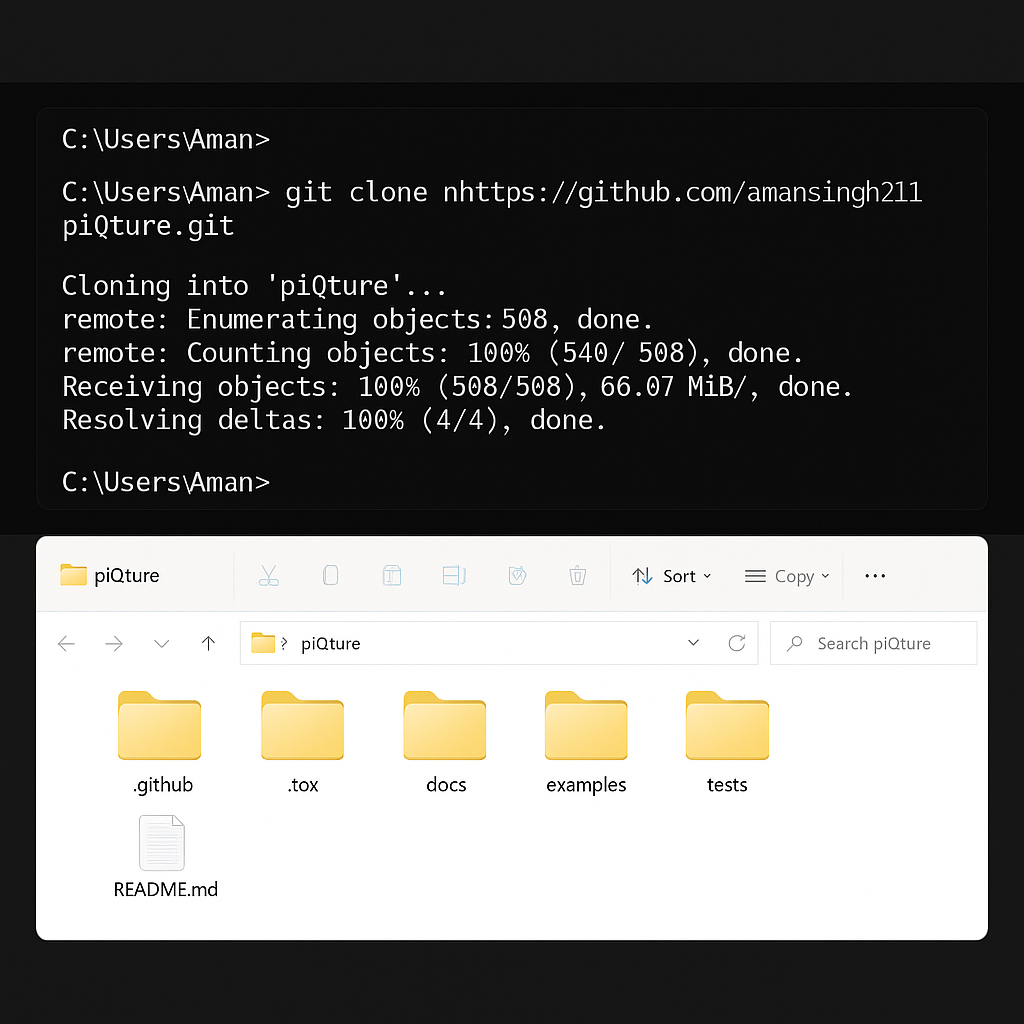
Command: I opened my terminal and typed::
1git clone https://github.com/amansingh2116/piQture.gitMake sure to use your GitHub username instead of
amansingh2116!What Happened: This copied the whole
piQtureproject to a folder on my computer. Then, I typedcd piQtureto go into that folder.Setting Up Dependencies: An important step many beginners miss is setting up what the project needs to run. The
piQtureREADME.mdfile told me to run (always read this file!):1pip install -r requirements.txtThis sets up all the extra tools/libraries the project needs to work on my computer.
Tip: Always, check the project’s
README.mdfor setup instructions. It helps you set up the project and understand how it works.
Step 3: Create a New Branch – Keeping Your Work Tidy
Before making any changes, it’s best practice to create a new branch. Think of a branch as a separate parallel timeline for your work.
Command:
1
2
git checkout -b qcnn.py >> Switched to a new branch qcnn.pyWhy: Don’t work on the
mainbranch—it’s a common beginner mistake. It can get messy, especially if the project changes while you’re working on it. A new branch keeps your changes separate and organized, so you can share them later. I named itqcnn.pybecause that’s the file I was working on.
Step 4: Code the Changes – Solving Issue #42
Now came the actual coding! My goal was to add robust validation to the qcnn.py file, specifically within the sequence method of the QCNN class, as detailed in Issue #42.
Understanding the Problem: The
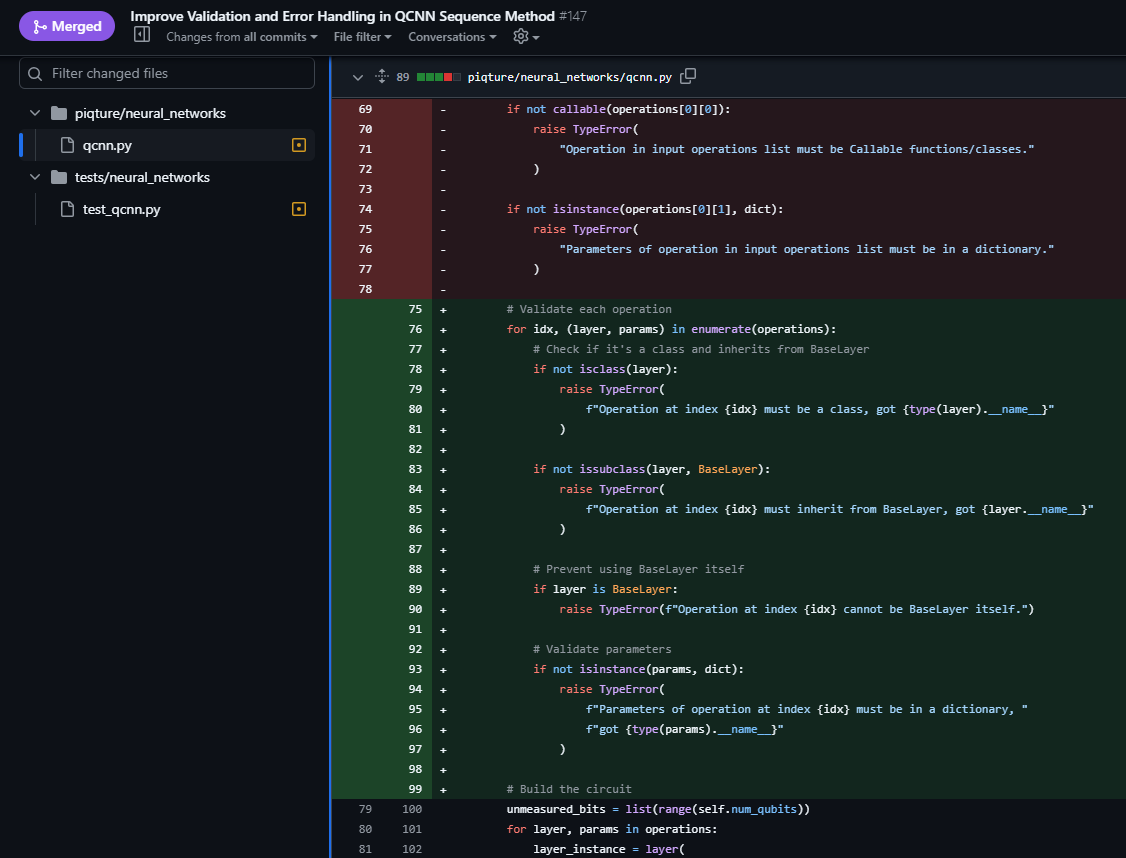
sequencemethod was supposed to take ’layers,’ but it didn’t check if they were the right kind of layers. This could cause problems later if someone used the wrong thing, like a dictionary or a string, instead of a proper layer.What I Changed: I added checks to ensure:
- Each
operationpassed into thesequencemethod was really a class (isinstance(operation, type)). - Each
operationinherited from (was related to)BaseLayer(issubclass(operation, BaseLayer)), so it would work as apiQturequantum layer. - The
paramsinput was a dictionary, which is what the layers needed.
- Each
Error Handling: I added clear error messages using
TypeError. For example:1raise TypeError(f"Operation at index {i} must be a class, got {type(operation).__name__}")This makes it easier for people to see what went wrong and fix it.
AI Help: ChatGPT helped me understand some coding ideas like inheritance, which I hadn’t used much before. It showed me how
BaseLayerworked like a starting point for other layers.
Step 5: Test Locally – Ensuring My Fix Didn’t Break Anything
Coding the solution was only the half part. The next critical step was to ensure my changes actually worked and, just as importantly, didn’t introduce new bugs.
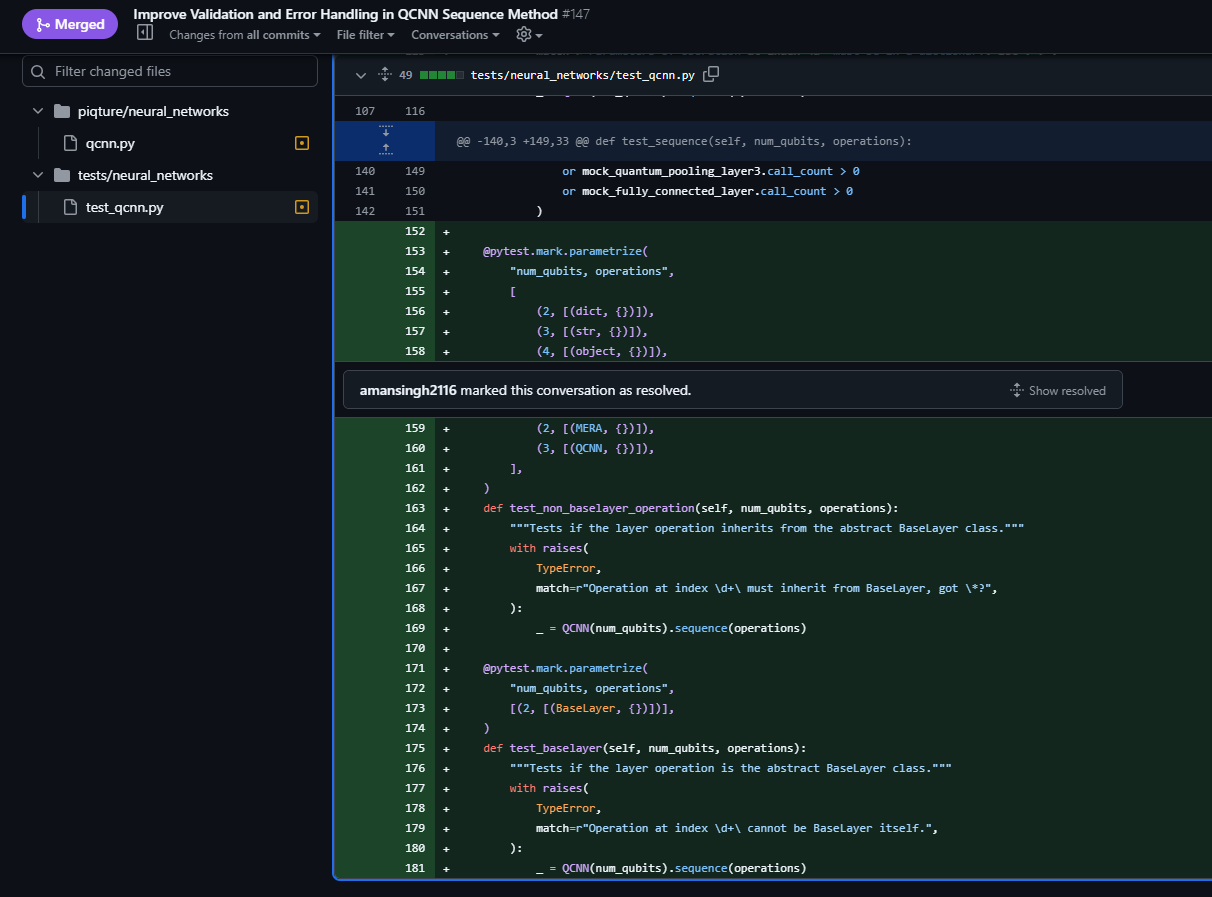
What I Did: I added new test cases to
tests/neural_networks/test_qcnn.pyusingpytest, a popular Python testing framework. These tests checked if my new code caught wrong inputs like it should. For example:1 2 3 4 5 6 7 8 9 10 11 12 13 14 15 16from pytest import raises from piqture.neural_networks.qcnn import QCNN from piqture.layers.base import BaseLayer # Assuming this is needed for a test def test_invalid_layer_type(): with raises(TypeError, match=r"Operation at index \d+ must be a class, got str"): QCNN(4).sequence(["not_a_class_string"]) def test_non_baselayer_class(): class MyRandomClass: pass with raises(TypeError, match=r"Operation at index \d+ must be a subclass of BaseLayer"): QCNN(4).sequence([MyRandomClass]) def test_invalid_params_type(): with raises(TypeError, match=r"Parameters must be a dictionary, got list"): QCNN(4).sequence(layers=[SomeValidLayer], params=[1, 2])After writing the tests, I ran them by typing
pytest tests/neural_networks/test_qcnn.pyin my terminal (or justpytestfrom the main project folder).Lesson Learned: This step taught me a lot. I learned how useful
pytestis, especially for checking errors withraises. I also found out about something called decorators, like@pytest.mark.parametrize, which let me test different inputs without rewriting the same test."
Step 6: Commit and Push – Saving Your Progress
Once my code was written and tested locally, it was time to save those changes to my GitHub fork.
Commands:
git add .(This gets all your changes ready to save.)git commit -m "Add layer validation and tests to QCNN sequence"(This gets all your changes ready to save.)git push origin qcnn.py(This sends your saved changes to yourqcnn.pybranch on GitHub.)
Tip: Always write clear and concise commit messages. It helps you and the project team understand what you did and why.
git add .git commit -m "changed the error handling logic in qcnn.py">> [qcnn.py fef67f8] changed the error handling logic in qcnn.py 1 file changed, 150 insertions(+) create mode 100644 qcnn.pygit push origin qcnn.py>> Enumerating objects: 4, done. Counting objects: 100% (4/4), done. Delta compression using up to 8 threads Compressing objects: 100% (3/3), done. Writing objects: 100% (3/3), 1.23 KiB | 1.23 MiB/s, done. Total 3 (delta 1), reused 0 (delta 0), pack-reused 0 remote: Resolving deltas: 100% (1/1), completed with 1 local object. remote: This branch is 1 commit ahead of the upstream branch. To https://github.com/SaashaJoshi/piQture.git * [new branch] qcnn.py -> qcnn.py
Step 7: Open the Pull Request – Proposing Your Contribution
With my changes pushed to my fork, I could now propose them to the original SaashaJoshi/piQture repository.
What I Did: I went to my copy of the project on GitHub (
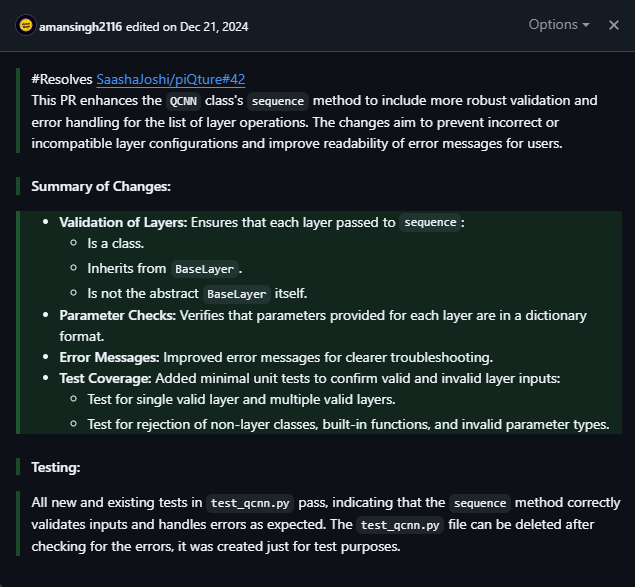
https://github.com/amansingh2116/piQture). GitHub noticed I had added a new branch and showed a big ‘Compare & pull request’ button (on top of the code tab in the forked repository).Crafting the PR Description: It’s important to write a clear description so the maintainers know what you did and why. My description was simple but effective:
Title: ‘Improve Validation and Error Handling in QCNN Sequence Method’ (Clear and to the point).
Body:
```bash
Resolves #42
- Added layer validation
- Improved error messages
- Added tests
```

Writing `Resolves \#42` connects your work to the issue, which helps the maintainers keep track.
The Maintainer Dance: Feedback, Fixes, and Learning
Submitting the PR was just the start. The real learning began during the feedback loop with Saasha, the maintainer. This iterative process is the heart of open-source collaboration and where you grow the most.
Round 1: Test File Chaos – Learning the Structure
- Problem: My tests didn’t work when GitHub checked them automatically. I made a new test file called
test_qcnn.pyin thetests/neural_networks/folder, but I should have added my tests to the existingtests/neural_networks/test_qcnn.pyfile. The project wanted allQCNNtests in that one file. - Saasha’s Help: She kindly commented on my PR, telling me how the tests were set up and saying, ‘Please add your tests to the existing
tests/neural_networks/test_qcnn.pyfile so they work properly. - Fix: I moved my tests to the right file, deleted the extra file I made, and sent the changes to my branch.
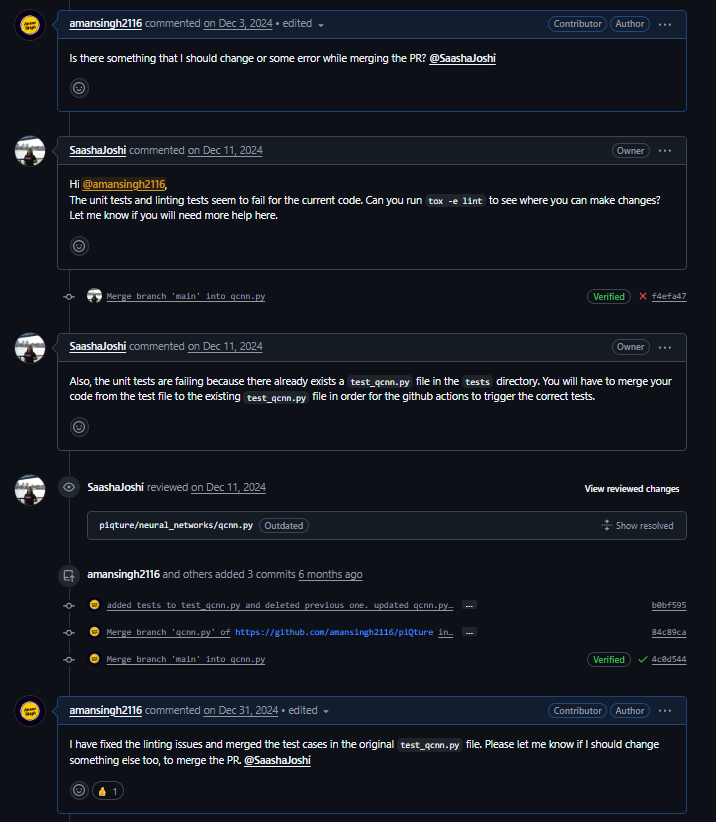
Round 2: Linting Woes – The Importance of Clean Code
- Problem: After fixing the test file, GitHub found new problems called ’linting’ checks. These checks make sure your code looks neat and follows rules, like not having lines that are too long or extra spaces. My code had problems because some lines were too long and the spacing wasn’t right.
- Saasha’s Tip: She said, ‘Run
tox -e linton your computer to find these problems before sending your changes.’ I had no idea about this! - Fix: I installed
toxand rantox -e lintin my terminal. It showed me all the mistakes right away. I fixed my code by shortening long lines, fixing the spacing, and following the project’s rules. This was a total newbie moment for me; I’d never heard of linting before, but I learned why neat code is important when working with others.
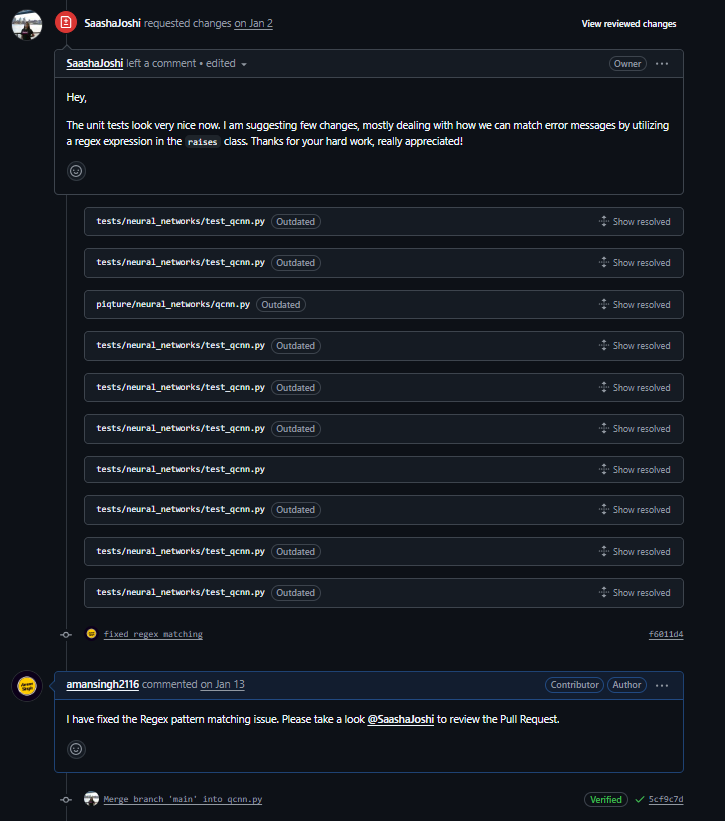
Round 3: Regex Refinement – Precision in Testing
- Problem: My tests were now working, but Saasha noticed that the patterns I used for checking errors called regex (used with
pytest.raises(TypeError, match=...)), were too simple (e.g.,match=".*"). This meant the test might pass even if the error message wasn’t exactly right, which wasn’t good. - Saasha’s Suggestion: She said, ‘Use more exact patterns like
r'Operation at index \d+ must be a class, got .*'so the test checks the right error message.’ - Fix: I changed my tests to use more exact patterns that matched the error messages I wanted. I learned a bit about regex this way, and Claude helped me come up with better patterns.
Tackling Merge Conflicts
While working on my changes, I ran into a common problem in open source: a merge conflict. After saving some of my work to my qcnn.py branch, Saasha added someone else’s changes to piQture’s main branch. That person’s changes were also in the qcnn.py file I was working on.
Later, when I tried to update my work with the latest changes from the main branch using git pull upstream main, Git got confused! It said there was a ‘merge conflict’ because my changes and the new updates were in the same place.
Here’s how I fixed it:
Step 1: Spot the Conflict: Spot the Conflict: Git showed me the problem in
qcnn.pywith marks like<<<<<<< HEADfor my changes and>>>>>>>for the main branch’s changes. My new code was in the same spot as someone else’s changes to a setting.Step 2: Resolve Locally: I opened
qcnn.pyin VS Code, and it showed me the parts that didn’t match. I had to fix the file by choosing which changes to keep or how to mix them. I kept my new code because it was important for my work, but I added the other person’s change too. I just had to put them together carefully.Step 3: Test Again and Commit: After fixing it, I ran
pytestto make sure everything still worked. Then I saved my fixes withgit add qcnn.py,git commit -m 'Resolve merge conflict', and sent them to my branch withgit push origin qcnn.py.Outcome: After about 30 minutes, my branch matched the main branch again, and my PR was ready to continue.
What I Learned: Merge conflicts aren’t as scary as they seem—they just mean Git needs your help to sort things out. I learned how to use git pull, what the conflict marks meant, and why it’s important to test right after fixing a conflict. It showed me how working with others can get tricky, but I learned to stay calm, fix things step by step, and talk to the team. I even told Saasha on the PR: ‘Resolved a conflict – please let me know if I missed anything!’ That helped show I was trying to do things right.
The Final Stretch & The “Merged!” Moment
Getting feedback and fixing things, including the merge conflict, took from November to December 2024. I made 8 commits in total, each one making my code better with Saasha’s helpful advice.
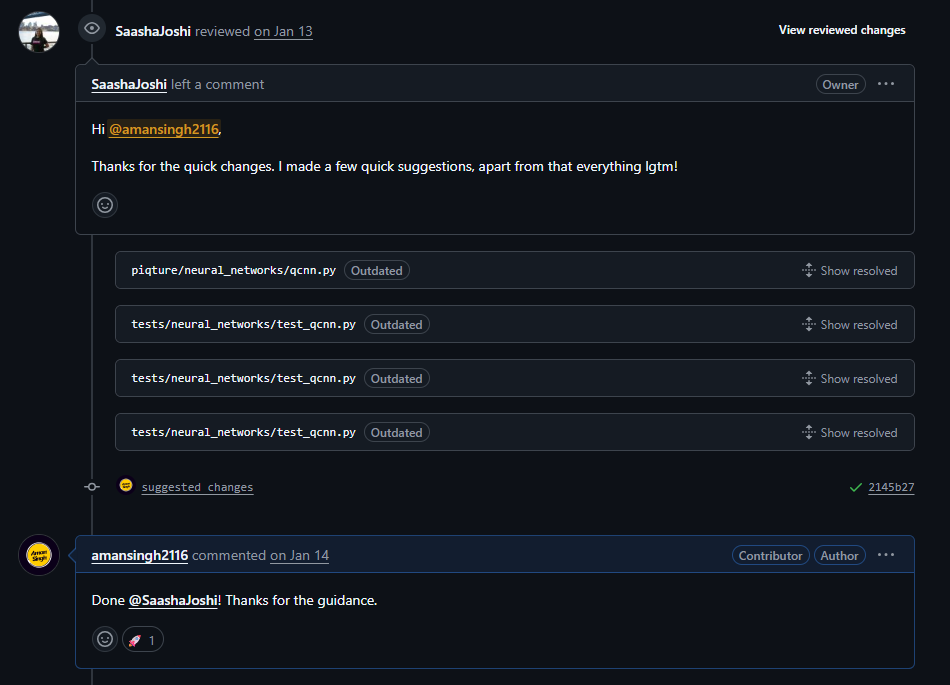
Then, on January 13, 2025, it happened. Saasha accepted my work with a nice comment: ‘Thanks for the contribution!’
Seeing ‘Merged’ felt amazing, like finishing a big race. All my hard work—coding, testing, and fixing things—led to that moment. My code was now part of a real open-source project!
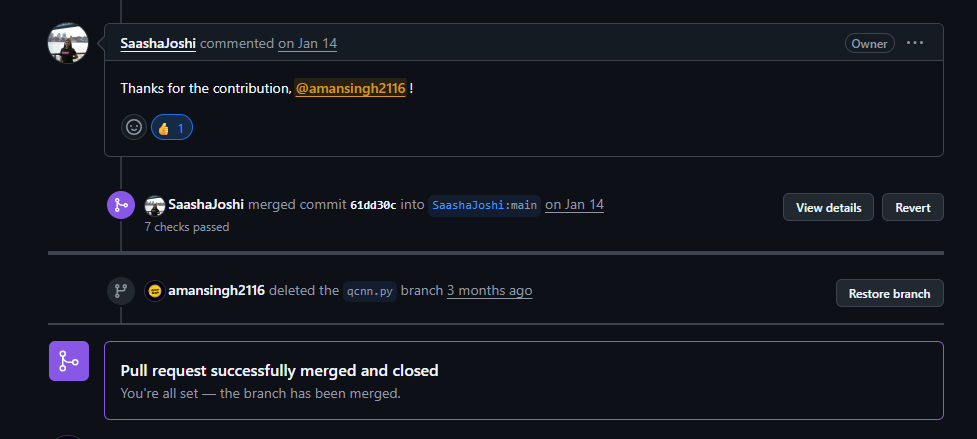
Here, is the link to my complete PR. You can check out the timeline and how the code changed until it was accepted.
Lessons We Learned Along the Way
Submitting that pull request (PR) was more than just a small win—it felt like a big learning adventure in coding and teamwork. Here’s what we picked up during this journey:
- Getting Comfortable with Git: At first, Git felt like a confusing puzzle with all its commands. But over time, we got the hang of it. Things like creating branches, saving our work, sharing it, and even fixing mix-ups started to feel much easier.
- Understanding Coding Basics: While working on the
BaseLayerpart, ideas like inheritance and classes started to make sense. Reading about them is one thing, but using them in a real project really helped us learn. - Learning to Test Code: We discovered tools like
pytestand learned how to write tests using patterns like regex. It showed us how important it is to test our code to make sure it works well. - Keeping Code Neat: We found out why clean code matters, thanks to tools like
toxthat help check for mistakes like messy spacing. It’s really important when working with others on a project. - Being Patient: We realized that maintainers are busy people, and sometimes we had to wait a while for their feedback. It taught us to be patient and understand that open source doesn’t move as fast as school projects.
- Growing Through Feedback: Saasha’s comments weren’t just pointing out mistakes—they were super helpful tips. We learned to take feedback as a chance to improve, and it made our coding better.
A Few Tips for Your First PR
From what we’ve been through, here are some simple ideas to help anyone new to open source:
- Find Something You Like: Look for a project or task that you’re excited about. When you care about it, it’s easier to keep going, even if things get tricky.
- Use AI Tools Wisely: Tools like ChatGPT or Claude can help explain things or give you ideas for code. But always double-check what they suggest and try to understand how it works—otherwise, you’re just copying without learning.
- Test Your Work Often: Don’t wait for GitHub to find problems. Test your code on your computer as you go. Fixing mistakes early saves time for everyone.
- Ask Questions First: Before jumping into big changes, ask the maintainers for advice. You can comment on the task or start a draft PR to make sure you’re on the right track.
- See Feedback as Help: Don’t feel bad if maintainers suggest changes. Their feedback is like a guide to help you get better at coding.
- Start with Something Small but Useful: Your first PR doesn’t need to be huge. Pick a task that solves a real problem or adds something helpful, even if it’s small. Skip tiny fixes that don’t matter much.
- Be Kind and Patient: Open source can take time. Respect the maintainers’ schedules and follow the project’s rules. They’ll appreciate your effort.
What’s Next for Us—and for You?
Getting that first PR accepted gave us a big confidence boost. When we have time, we plan to look for more tasks in piQture and check out other Python projects. This experience added a real story to our GitHub profile—not just little green dots, but proof we can handle tough code, work with others, and make a difference.
Open source isn’t just for expert coders. It’s for anyone who wants to learn, solve problems, and help out in the tech world. Our first PR took about two months from start to finish, but with what we’ve learned, your journey might be quicker.
Now it’s your turn! Find a project, pick a task, and give it a try. Have your own first PR story or questions about starting? Share them in the comments—we’d love to hear from you and cheer you on!